AI vocabulary learning app: Best apps in 2026 (spaced repetition + AI flashcards)
Which AI vocabulary learning app is worth it in 2026? A practical comparison of the best apps for English, French, Spanish & more — with spaced repetition, active recall, a 14-day study plan, a feature checklist, and tips on using okti to turn your own texts into high-quality vocab flashcards fast.
AI vocabulary learning app: Best apps in 2026 (spaced repetition + AI flashcards)

Learning vocabulary isn’t the hard part. Remembering vocabulary long-term is.
Most apps make you feel productive — streaks, points, quick quizzes — yet after a few weeks the same problems show up:
- You recognize words in exercises, but can’t produce them in conversation.
- You “learn” lists, then forget them right before you need them.
- You collect vocabulary, but don’t review it in a system.
A good AI vocabulary learning app can help — not because AI is magic, but because it can reduce friction:
- Active recall (you actually retrieve the word)
- Spaced repetition (you review at the right time)
- Faster creation of high-quality practice materials (flashcards, cloze sentences, examples)
This guide gives you:
- a practical 2026 app comparison
- a feature checklist that matters
- an AI workflow for turning your own texts into vocab cards
- a 14‑day plan you can stick to
Table of contents
- Quick take: Which AI vocabulary learning app is best?
- What does “AI” mean in vocabulary apps?
- The 7 features that actually matter (checklist)
- Quick comparison: top vocab apps (2026)
- Pick the right app for your goal (school, exams, work, travel)
- Deep dive: best apps (pros & cons)
- AI workflow: turn texts & notes into vocab flashcards
- Better prompts, better cards (quality rules)
- 14‑day plan: make vocab stick
- FAQ
- Conclusion
Quick take: Which AI vocabulary learning app is best?
If you want the short answer:
- For long-term retention (exams, university, technical vocabulary): choose spaced repetition + your own content.
- For daily habit & motivation: use a gamified app, but pair it with active recall.
- For speed: AI is most useful when it helps you create good cards from your materials.
Learn vocabulary from your own texts — not generic word lists
With okti you can create study cards from notes or learning materials and review them with active recall.
try okti for freeWhat does “AI” mean in vocabulary apps?
“AI features” typically fall into a few buckets:
1) AI generates practice (flashcards, cloze sentences, examples)
You paste a text or a list — the app outputs:
- flashcards (word → meaning + example)
- cloze exercises (fill the gap)
- synonyms/antonyms
- pronunciation pairs for common confusions
2) AI personalizes reviews
Spaced repetition can work without AI. But AI can add value by:
- detecting why you keep missing a word (false friends, similar words)
- adapting examples to your level
- choosing the right exercise type (typing vs cloze)
3) AI acts as a tutor
Chat-style tutoring can be great — but only if it drives retrieval practice, not just explanations. okti’s Tutor mode is built around this: you name a learning goal, it builds a personalized path of interactive lessons, and you can generate practice flashcards directly from each lesson.
If a feature doesn’t make you answer (type/say/fill), it’s probably not improving your vocabulary as much as it feels.
The 7 features that actually matter (checklist)
1) Spaced repetition with sensible intervals
Look for automatic scheduling that uses performance (hard vs easy), not random reminders.
2) Real active recall (not only multiple choice)
Multiple choice often measures recognition. Prefer typing, cloze, or speaking.
3) Import your own content
Your fastest vocabulary growth comes from words you repeatedly encounter:
- course materials
- articles in your domain
- work notes
4) Card quality controls
AI can generate 200 cards in minutes — but quality beats quantity.
Good cards are:
- short
- one meaning per card
- one natural example sentence
5) Audio and pronunciation
Minimum: high-quality audio. Better: speech input and feedback.
6) Context and collocations
Vocabulary is more than translations. Collocations (“make a decision”) make recall easier.
7) Low friction daily reviews
Fast startup, clear “review” mode, and a small daily goal.
Quick comparison: top vocab apps (2026)
| Tool | Spaced repetition | Your content | AI features | Speaking | Usable for free |
|---|---|---|---|---|---|
| oktiEmpfohlen | Yes | Yes | Yes | Spoken answers | Yes |
| Anki | Yes | Yes | No | No | Yes |
| Duolingo | No | No | Yes | Yes | Yes |
| Babbel | No | No | Yes | Yes | No |
| Memrise | Yes | No | Yes | Yes | Yes |
| Quizlet | Yes | Yes | Yes | No | Yes |
“Usable for free” doesn’t mean “fully free”. Many apps lock key features behind subscriptions or limit imports.
Pick the right app for your goal (school, exams, work, travel)
School
You need fast testing + habit. A gamified app can help daily consistency, but you’ll still want targeted recall for the words your teacher tests.
Exams / university / technical vocabulary
You need your own content + spaced repetition. Generic lists won’t match your course language.
Work
You need phrases, collocations, and production. Typing and writing short sentences beats passive review.
Travel
You need quick recall, pronunciation, and situational phrases.
If your vocabulary is domain-specific
Build flashcards from your own materials (notes, articles, scripts) instead of generic lists.
start with oktiDeep dive: best apps (pros & cons)
- Turn your materials into study cards
- Active recall review flow
- Spaced repetition logic
- Spoken answers with AI feedback
- Extremely strong spaced repetition
- Full control + add-ons
- AI flashcards built-in
- Beginner-friendly out of the box
- Great habit builder
- Audio + speaking
- Import your own content
- Targeted spaced repetition for your deck
Quizlet
Great for shared sets and multiple study modes. Long-term retention depends on whether you consistently use recall-heavy modes (typing/write), not just matching. (Torn between the two classics? See Anki vs Quizlet in 2026.)
Memrise
Often strong on audio and short sessions. Depth and control vary by course/mode.
Babbel
Structured courses and dialogues. Less suited if your goal is “learn vocab from my text”.
LingQ / Clozemaster
Excellent for learning in context. Combine with retrieval practice to avoid keeping words passive.
AI workflow: turn texts & notes into vocab flashcards
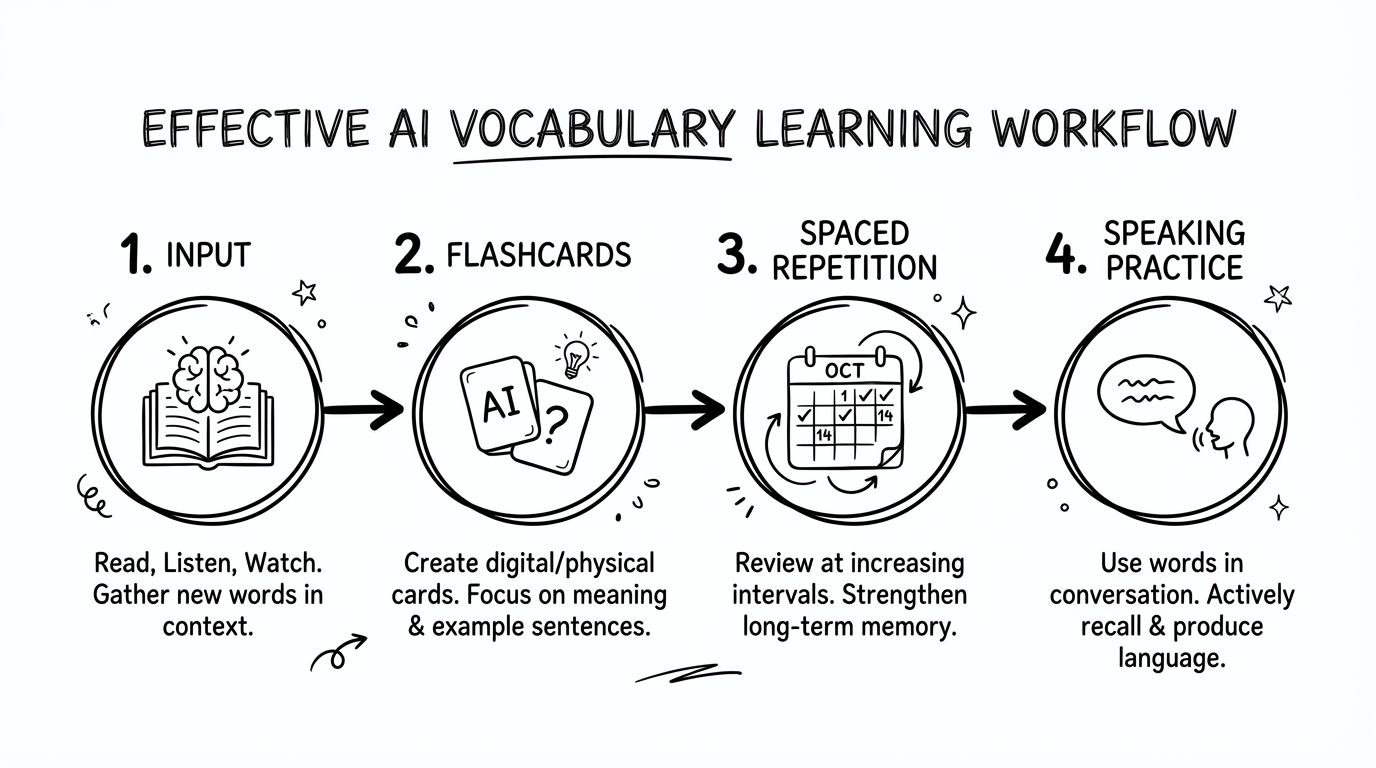
Step 1: Choose input you’ll actually reuse
One article, one chapter, one set of notes — something you’ll see again.
Step 2: Pick 10–20 high-value words
High-value means: you’ll use them, they fit your goal, and they keep showing up.
Step 3: Generate recall-first cards
Three formats that work:
- L1 → L2 typing (production)
- Cloze sentence
- Collocation card (phrase + meaning)
Step 4: Review by schedule, not by mood
Do reviews first, then add new words. Consistency beats intensity.
(More on the card-generation part in our free AI flashcard generator guide.)
Front: Cloze: “The team decided to ____ a new process.”
Back: establish = to set up; one natural example; collocations (establish a rule/process/company); note: don’t confuse with “install”.
Want to automate this workflow?
okti helps you turn your materials into recall-first study cards and review them efficiently.
open oktiBetter prompts, better cards (quality rules)
AI output quality depends on constraints. Use these three rules:
Rule 1: One card = one meaning
Split polysemy into separate cards.
Rule 2: Force production
Ask for typing/cloze/dialog cards, not only translations.
Rule 3: Add collocations
They create “hooks” for recall.
Create 12 vocabulary flashcards from the text below. Constraints: one card = one learning goal; for each card provide (1) target word, (2) short meaning in my native language, (3) one natural example sentence, (4) a cloze version of that sentence, (5) one common collocation. Avoid rare words. Prioritize vocabulary relevant to [my goal].
Privacy (pragmatic)
If your text contains sensitive information (names, internal data), paste a redacted version or only the part you need for learning.
14‑day plan: make vocab stick
Rules
- max 20 new words/day
- reviews first, new words after
- cards must require active recall
Days 1–3: setup
- 10–15 min reviews
- 10 min: 10–15 new words
Days 4–7: stabilize
- 15 min reviews
- 5–10 min new words
- 2 min: say 3 words out loud
Days 8–14: transfer
- 15–20 min reviews
- 5 min new words
- 5 min: write 5 sentences using target words
Create cards in both directions (L2 → L1 and L1 → L2). Exams often test production, not recognition.
Common reasons you forget vocabulary (and how to fix them)
Even with a great app, vocabulary tends to fade for predictable reasons. Fixing the reason is usually easier than switching tools.
1) You only practice recognition
If your sessions are mostly matching or multiple choice, your brain learns “this looks familiar” — not “I can say it”.
Fix: Ensure every session contains at least one production task:
- type the word (L1 → L2)
- answer a cloze sentence
- say the word or the sentence out loud (in okti you can speak your answer — it gets transcribed and you receive AI feedback on it)
2) Your cards are too broad
Cards like “run = laufen/rennen/führen/betreiben …” are impossible to review efficiently.
Fix: split meanings. One meaning per card. Add a short cue:
- run (exercise) → laufen
- run (operate) → betreiben
3) You add too many new words, too fast
The review queue becomes overwhelming, and you quit.
Fix: cap new words (10–20/day) and keep reviews short but daily.
4) You learn words without “hooks”
Single-word translations are weak memory anchors.
Fix: store words with:
- a collocation (make a decision)
- a situation (at the pharmacy)
- a personal sentence (relevant to your life)
5) You never use the words actively
If you don’t write/speak with the words, they stay passive.
Fix: add a 5‑minute “output block”:
- write 5 sentences using today’s target words
- record yourself reading the example sentences
- do a 2‑minute mini-dialog (even alone)
After your review session, pick 3 words and say one sentence for each — out loud. It’s a fast bridge from flashcards to real usage.
How to combine apps (without duplicating work)
A simple, effective setup for many learners is:
- One habit app for consistency (short daily sessions, listening, speaking)
- One spaced-repetition system for the words that matter to you
Practical examples:
- Duolingo/Babbel for the “daily push” + Anki/okti for your exam/work vocabulary
- LingQ for reading in context + okti for extracting high-value vocabulary and reviewing it
The key is to avoid importing everything twice. Let one app be your “practice playground” and the other be your “memory system”.
A quick “AI vocab” quality checklist
Before you keep a generated card, ask:
- Does this card test recall (typing/cloze), not just recognition?
- Is the example sentence natural and at my level?
- Is the meaning unambiguous (one meaning per card)?
- Is there a collocation or context clue?
If 2+ answers are “no”, edit or discard the card. Quality cards reduce review time dramatically.
Spaced repetition in plain English (so you actually use it)
Spaced repetition sounds fancy, but it’s just this idea:
- right after learning a word, you remember it easily
- after a few days, you forget it quickly
- if you review right before you forget, you strengthen the memory with less effort
That’s why good apps schedule reviews at increasing intervals (e.g., 1 day → 3 days → 7 days → 14 days). When you fail a card, the interval shrinks again.
Two settings that matter most
-
New words per day
If you set this too high, you’ll drown in reviews. Start with 10–20. -
Your grading honesty
If you mark a word “easy” when it was a guess, the schedule becomes wrong and you’ll forget it later. Be strict: “easy” should mean instant recall.
- Easy: instant recall, no hesitation
- Good: correct but a bit slow
- Hard: correct but only with effort / close call
- Again: wrong or guessed
When spaced repetition works, your daily session feels surprisingly short — because you mostly review what you’re about to forget, not everything.
FAQ
Do AI vocabulary apps actually work?
They work when they make you retrieve words (active recall) and review them on schedule (spaced repetition). AI is most useful for generating good cards and explanations for mistakes.
How many new words should I learn per day?
For most learners, 10–20 new words per day is sustainable — if you take reviews seriously.
Is multiple choice enough?
Not by itself. Mix in typing, cloze, or speaking to train production.
What’s better: learning in context or flashcards?
Both. Read/listen for context, then extract high-value vocabulary and drill it with retrieval practice.
Conclusion
In 2026, the best AI vocabulary learning app is the one that turns your time into active recall + spaced repetition — and keeps your daily routine frictionless.
One final mindset shift that helps a lot: treat vocabulary like a small “portfolio”. You don’t need to know every new word you see. You need a system that reliably turns high-value words into long-term memory — and drops the rest. AI can speed up selection and card creation, but the retention still comes from consistent reviews and occasional real-world use. If an app makes reviews feel heavy, reduce new words — the goal is a system you can sustain for months.
If you only remember one thing:
You don’t remember words by “learning more”, but by reviewing better.
Ready to learn vocab from your own materials?
Start with okti and build a vocabulary system that actually sticks.
try okti