best ai study assistant: the top tools in 2026 (comparison + checklist)
Looking for the best ai study assistant in 2026? Compare the top tools for summaries, flashcards, quizzes, and study plans. Includes a feature & price checklist, practical workflows, FAQ, and how okti can turn your files into study-ready materials.
best ai study assistant: the top tools in 2026 (comparison + checklist)

If you’ve ever spent a whole Sunday turning lecture PDFs into summaries, flashcards, and a realistic study plan, you already know the problem: the work around learning steals time from actual learning.
A best ai study assistant should reduce that overhead:
- convert PDFs/slide decks into structured notes
- generate high-quality flashcards and practice questions
- help you revise with spaced repetition
- keep everything organized for the exam
This guide is practical: you’ll get a comparison of popular tools, a decision checklist, and workflows you can copy today.
Table of contents
- What “best ai study assistant” actually means (and what it doesn’t)
- Quick comparison: 7 popular tools
- The workflow that makes an ai study assistant worth it
- Detailed comparison: strengths, weaknesses, best use cases
- Feature checklist: what to look for
- Pricing: what you typically pay for
- How to use an ai study assistant without hurting your learning
- FAQ: best ai study assistant
- Conclusion: which one should you pick?
What “best ai study assistant” actually means (and what it doesn’t)
When people google “best ai study assistant”, they often mix 3 different product categories:
- Learning content tools (summaries, notes, Q&A over PDFs, lecture slides)
- Practice & repetition tools (flashcards, spaced repetition scheduling, quizzing)
- Study organization tools (planning, task lists, calendars, progress tracking)
A single tool rarely nails all three. So the “best” assistant is the one that fits your workflow + content type + privacy expectations.
If a tool saves you time but doesn’t increase recall (or accuracy), it’s not a study assistant — it’s just a summarizer.
What an ai study assistant should not do
- replace active recall with passive reading
- generate “pretty notes” that you never review
- produce answers you can’t verify (hallucinations)
The best tools help you practice and understand, not just consume.
Quick comparison: 7 popular tools
The list below includes a mix of AI-first study assistants and “study stacks” (a classic app + AI features).
| Tool | PDF / slides | Flashcards | Spaced repetition | Q&A on your files | Export / ownership | Privacy controls |
|---|---|---|---|---|---|---|
| oktiEmpfohlen | Yes | Yes | Yes | Yes | Yes | Yes |
| Anki (+ AI add-ons) | No | Yes | Yes | No | Yes | Yes |
| Quizlet | Yes | Yes | Yes | Yes | No | No |
| RemNote | Yes | Yes | Yes | No | Yes | Yes |
| Notion (+ Notion AI) | Yes | No | No | Yes | Yes | Yes |
| StudySmarter | Yes | Yes | Yes | No | No | No |
| ChatGPT / Claude (general LLM) | Yes | Yes | No | Yes | Yes | No |
Turn your PDFs into flashcards in minutes
Upload lecture slides, generate study-ready flashcards, then revise with spaced repetition — all in one place with okti.
Try okti for freeThe workflow that makes an ai study assistant worth it
Most students pick tools by features (“Does it summarize PDFs?”). The better approach: pick by workflow.
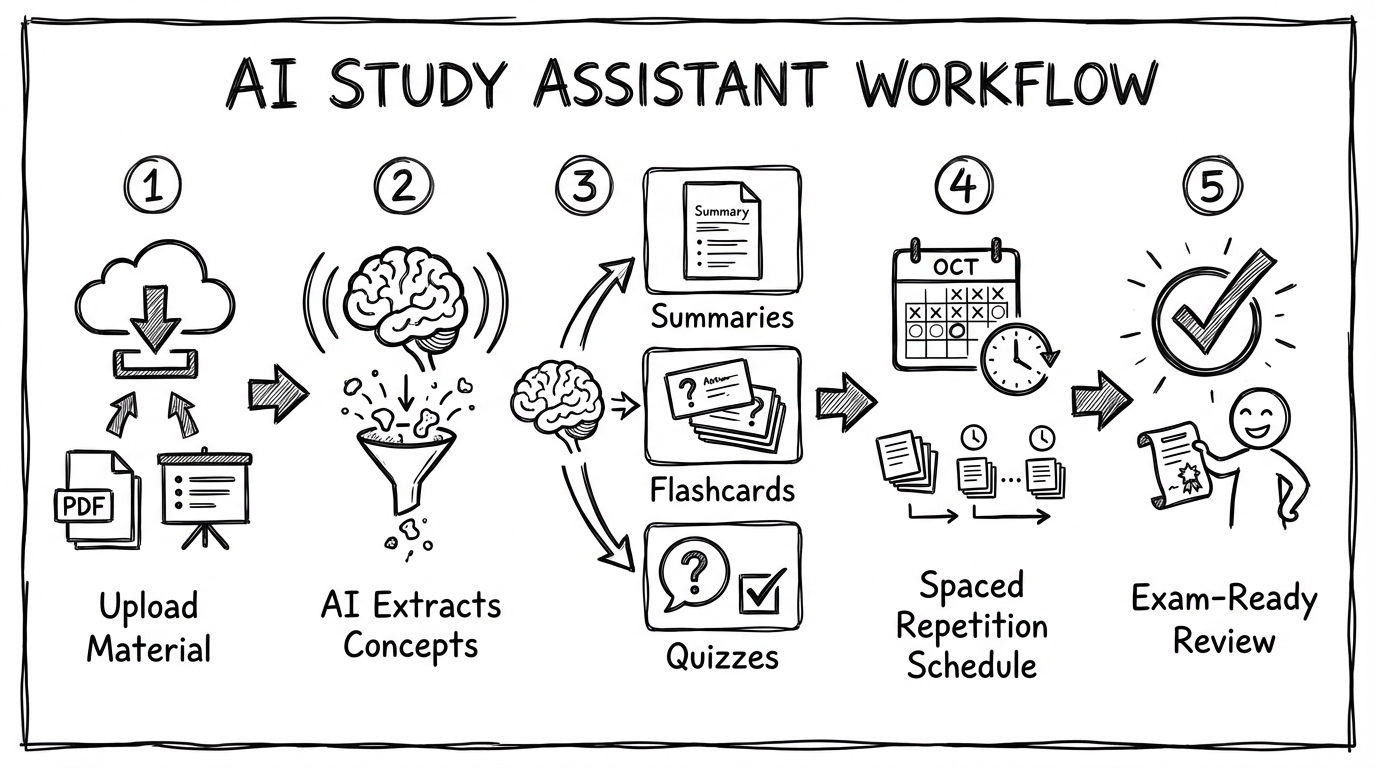
A good assistant supports the full loop from material → practice → review.
Step 1: Ingest (your real-world materials)
The biggest bottleneck is usually not “thinking” — it’s getting material into a usable format.
Look for:
- reliable PDF/slide handling
- structured extraction (headings, definitions, formulas)
- source citations or page references (so you can verify)
Step 2: Convert to practice (active recall)
Summaries are helpful, but the exam is recall + application.
A best ai study assistant should generate:
- flashcards that test one idea per card
- questions at different levels (definitions → application → tricky edge cases)
- quick “checks” after a section to reveal weak spots
Step 3: Schedule revision (spaced repetition)
If you learn everything once and “feel good,” you will forget.
Spaced repetition is effective because it:
- reintroduces content right before you forget
- focuses time on the hardest cards
Step 4: Close the loop (exam-mode review)
The last 7–14 days should look like:
- mixed practice (interleaving topics)
- timed quizzes
- focusing on error patterns, not “coverage”
Detailed comparison: strengths, weaknesses, best use cases
Below is a practical view of what each tool is great for.
1) okti (AI-first: files → flashcards → repetition)
Best for: students who want one workflow for PDFs/lecture slides → flashcards → spaced repetition.
Strengths
- built for study workflows (not generic note-taking)
- converts material into practice (not just notes) — here’s how the PDF → flashcards workflow looks
- AI chat (beta): ask questions about your uploaded files, notes and decks — and let it create flashcards, quizzes or notes for you
- tutor mode: a personal AI tutor that turns your exam goal into a path of interactive lessons
- supports repetition loops so you keep using what you generated
Weaknesses / watch-outs
- if you’re a “DIY power user” who loves full manual control over card formatting, a pure Anki setup can be more customizable
When to choose it
- you’re overloaded with PDFs, slides, scripts
- you want exam-ready practice quickly
Want a simple study stack?
Use okti as the hub: upload → generate → revise. Then export what you want to keep.
Open okti2) Anki (+ AI add-ons)
Best for: spaced repetition purists.
Strengths
- gold standard scheduling algorithm
- offline-friendly, data ownership
- huge ecosystem
Weaknesses / watch-outs
- AI is not native; you’ll patch together add-ons and external tools
- weak at “PDF understanding” unless you build pipelines
3) Quizlet
Best for: quick sets, sharing with friends, broad accessibility.
Strengths
- fast to start
- good for collaborative decks
- strong mobile experience
Weaknesses / watch-outs
- pricing tiers can be limiting
- less control over long-term ownership/export compared to Anki
4) RemNote
Best for: students who like the “notes → flashcards” integration.
Strengths
- structured notes and flashcards in one system
- built-in spaced repetition
Weaknesses / watch-outs
- more complex UI; setup overhead
- AI features vary by plan and evolve quickly
5) Notion (+ Notion AI)
Best for: organizing a degree (projects, notes, planning) with AI help.
Strengths
- best-in-class organization + databases
- AI can help rewrite, summarize, brainstorm
Weaknesses / watch-outs
- not a spaced repetition tool
- easy to end up with “beautiful pages” but little practice
6) StudySmarter
Best for: all-in-one student app with community-driven materials.
Strengths
- combines summaries, flashcards, and planning
- sharing/community content
Weaknesses / watch-outs
- quality of shared content can be inconsistent
- export/ownership is often limited
7) ChatGPT / Claude (general LLM)
Best for: explaining concepts and generating custom practice — if you know how to prompt. Our guide to studying with ChatGPT has ready-made templates.
Strengths
- flexible: explanations, examples, practice questions
- adapts to your questions
Weaknesses / watch-outs
- not a study system: no native spaced repetition
- requires careful verification
- privacy depends on your settings + provider
Feature checklist: what to look for
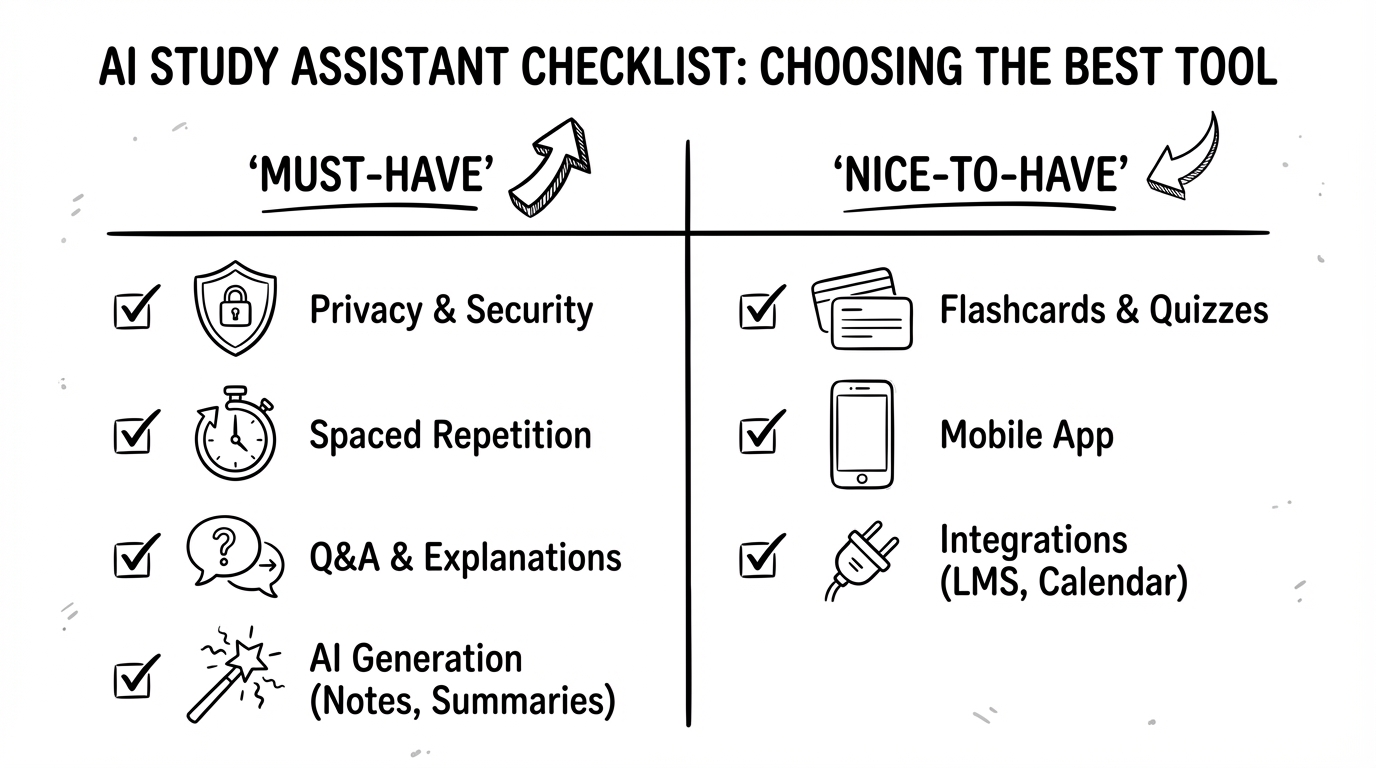
Pick a tool that supports recall, not just summaries.
Must-have (for most students)
- Flashcard quality (one fact per card, clear phrasing)
- Q&A grounded in your sources (page references or quotes)
- A repetition mechanism (built-in spaced repetition or easy export)
- Fast capture (PDFs, slide decks, lecture scripts)
Nice-to-have (depending on your use case)
- integrations (Google Drive, LMS exports)
- collaboration (shared decks)
- offline mode
- mobile-first experience
Privacy questions you should ask
- Where are files stored?
- Can you delete uploads permanently?
- Can you export everything?
- Are your documents used for model training?
If a provider doesn’t answer these clearly, treat your content as public.
Pricing: what you typically pay for
AI study tools often follow a “freemium + pro” model:
- free plan for basic sets/notes
- paid plan for AI generation, larger uploads, faster processing
Don’t pay for five tools at once. Pick one “hub” for your material and one “repetition engine” if needed.
A pragmatic budget approach:
- $0–$10/month: one main tool (ideally includes repetition)
- $10–$20/month: add a general LLM for explanations if you really use it
How to use an ai study assistant without hurting your learning
AI can improve grades — but it can also create overconfidence.
Use AI for structure, not for final answers
Good uses:
- outline lecture topics
- propose flashcards
- generate quiz questions
- explain a concept in simpler language
Risky uses:
- memorizing AI-generated summaries without checking the source
- copying solved problems without understanding steps
The “3-pass” method (copy this)
- First pass (understanding): read the section and ask the assistant for a concept map.
- Second pass (practice): generate flashcards + 10 questions and answer without looking.
- Third pass (review): schedule repetition for the cards you missed.
Make hallucinations obvious
Ask the assistant to:
- quote the exact sentence from the PDF
- give page numbers
- list uncertainties (“I’m not sure about X”) instead of guessing
Common mistakes when using an ai study assistant
Mistake 1: Using AI only for summaries
Summaries feel productive, but they’re low-friction and often passive. If you only read AI summaries, you’ll usually overestimate understanding.
Fix: for every summary, generate at least:
- 10–20 flashcards (definitions + contrasts)
- 5 application questions (“What happens if…?”)
- 1 mini-mock exam (timed)
Mistake 2: Creating giant flashcards
AI tends to produce long cards with multiple facts. Those are hard to review and easy to “half know.”
Fix: enforce the rule: one card = one testable idea. If a card has “and/also,” split it.
Mistake 3: Trusting answers without grounding
General chatbots can sound confident even when wrong.
Fix: ask for:
- quotes from the source
- page numbers
- uncertainty flags (“I’m not sure, verify X in the PDF”)
Mistake 4: Switching tools every week
Your grades improve when you build a routine — not when you chase the newest feature.
Fix: pick one “hub” for your material and stick to it for a semester.
Prompt templates you can copy (for any tool)
Even dedicated apps benefit from good instructions. Here are templates that work well with most assistants.
1) Flashcard generator prompt
Ask for high-quality, exam-style cards:
- “Create 25 flashcards from the text. Use one concept per card. Prefer cloze deletions for formulas and short Q/A for definitions. Add one common misconception as a separate card when relevant. Keep answers under 20 words.”
2) Practice quiz prompt
- “Create a 12-question quiz: 6 easy definitions, 4 application questions, 2 tricky edge cases. Provide an answer key and brief explanations.”
3) “Teach me” prompt
- “Explain this topic in three layers: (1) simple analogy, (2) precise definition, (3) exam-style explanation with one worked example.”
4) Error analysis prompt
- “I got these questions wrong. Identify the underlying misconception for each, then create 5 targeted flashcards to fix it.”
Which ai study assistant is best for your subject?
Different majors have different pain points.
- Medicine / biology: lots of facts → prioritize flashcards + spaced repetition + image-friendly notes.
- Law: definitions + cases → prioritize structured Q/A, citations, and “issue spotting” practice questions (see our law flashcards AI app guide).
- Engineering / math: worked problems → prioritize step-by-step explanations and quiz generation with increasing difficulty.
- Business / economics: concepts + graphs → prioritize contrast cards (“X vs Y”) and application questions.
If your subject is fact-heavy, the repetition engine matters most. If it’s problem-heavy, the explanation quality matters most.
FAQ: best ai study assistant
What is the best ai study assistant in 2026?
There isn’t one universal best option. If you want a study workflow (PDFs → flashcards → spaced repetition), tools like okti or a RemNote/Anki setup are typically best. If you mainly need organization, Notion can be excellent.
Is an ai study assistant allowed at university?
Usually yes — as a learning tool. But rules differ for graded assignments and exams. Treat AI like a tutor: it can help you learn, but you still must submit your own work and respect citation rules.
Can AI create good flashcards?
Yes, if:
- cards are short and test one idea
- wording is unambiguous
- you edit the “bad ones” (AI will produce some fluff)
Do I still need spaced repetition?
Yes. AI makes creation faster, but forgetting still happens. Spaced repetition (or scheduled review) is the difference between “felt productive” and “remembered it on exam day.”
Should I use a general chatbot or a dedicated study app?
Use a dedicated study app when you need:
- structured decks
- review scheduling
- file-based Q&A with traceability
Use a general chatbot when you need:
- explanations and examples
- custom practice questions
- brainstorming and rewriting
Conclusion: which one should you pick?
Pick based on what you struggle with most:
- Too many PDFs/slides and no time: choose a workflow-first tool like okti.
- You already have cards but you forget them: focus on spaced repetition (Anki, built-in systems).
- You need to organize a whole degree: use Notion as your operating system and connect a repetition tool.
If you want the shortest path from “lecture files” to “exam-ready practice,” try okti and build your routine around active recall + spaced repetition.
Ready to turn your lecture files into practice?
Upload your material, generate flashcards and quizzes, and revise smarter with okti.
Start learning with oktiRelated posts
App alternatives
Anki vs Quizlet in 2026: Which Alternative Is Actually Better for Students?
App alternatives
Knowt Alternative 2026: 9 Better Options for Flashcards, AI Summaries, and Faster Studying
App alternatives
StuDocu Alternative 2026: 9 Legal & Free Ways to Get Study Notes, Summaries, and Flashcards