Create Flashcards from a PDF (AI): Step-by-Step Guide, Anki Export & Best Prompts (2026)
Learn how to turn any PDF into high-quality flashcards using AI (without memorizing hallucinations). Includes workflows, quality checklist, Anki import formats, tool comparison, prompts, and FAQ — plus how to do it fast with okti.
Create Flashcards from a PDF (AI): Step-by-Step Guide, Anki Export & Best Prompts (2026)
PDFs are great for reading — but they’re a terrible default format for exam performance. Most students do one of these:
- highlight a lot (feels productive, but trains recognition)
- write long summaries (helpful, but painfully slow)
Flashcards are the antidote because they force active recall and work perfectly with spaced repetition.
The catch: turning a 30–200 page PDF into good cards takes time. AI can save hours — if you use it with guardrails.
In this guide you’ll learn:
- which flashcard types work best for PDF-based studying,
- three practical workflows (manual, semi-automated, fully automated),
- a quality checklist to avoid learning wrong facts,
- how to export to Anki (fields, tags, formats),
- a simple tool comparison,
- copy/paste prompts that reliably produce usable cards,
- and how to do PDF → flashcards fast with okti.
PDF → flashcards in under 60 seconds
Upload your lecture notes or slides — okti extracts the key concepts and generates flashcards you can review with spaced repetition right away.
try okti for freeTable of contents
- Quick answer: how do I create flashcards from a PDF?
- Why PDF → flashcards works (learning science in plain English)
- The 3 flashcard types that are worth creating from PDFs
- Workflow 1: manual (fast and accurate)
- Workflow 2: semi-automated (copy/paste + AI)
- Workflow 3: fully automated (upload PDF → AI cards)
- Quality gate: how to avoid wrong flashcards
- Anki export: formats, fields, tags
- Tool comparison (2026): okti vs Anki vs “AI + Anki” setups
- Best prompts (copy/paste) for PDF-based flashcards
- FAQ: create flashcards from PDF with AI
- Conclusion
Quick answer: how do I create flashcards from a PDF?
A practical “works in real life” recipe:
- scope the PDF: one chapter (10–20 pages) instead of the whole document
- extract key ideas: definitions, mechanisms, formulas, typical exam questions
- turn ideas into questions: “What is…?”, “Why…?”, “How does X differ from Y?”, “When would you use…?”
- keep answers short: 1–4 sentences, a formula, or a small diagram
- test 10 cards: if you stumble, the cards are too big or too vague
AI can help with steps 2–4, but you should always verify cards against the PDF.
Why PDF → flashcards works (learning science in plain English)
Reading PDFs often leads to passive learning: You re-read and recognize phrases, which feels like understanding. But exams require retrieval.
Flashcards fix that by introducing:
- active recall (pulling knowledge from memory)
- fast feedback (you immediately see what you don’t know)
- spaced repetition (reviewing at increasing intervals)
PDFs are input. Flashcards are output. Exams measure output.
The key is quality: good flashcards are small, unambiguous, and exam-relevant.
The 3 flashcard types that are worth creating from PDFs
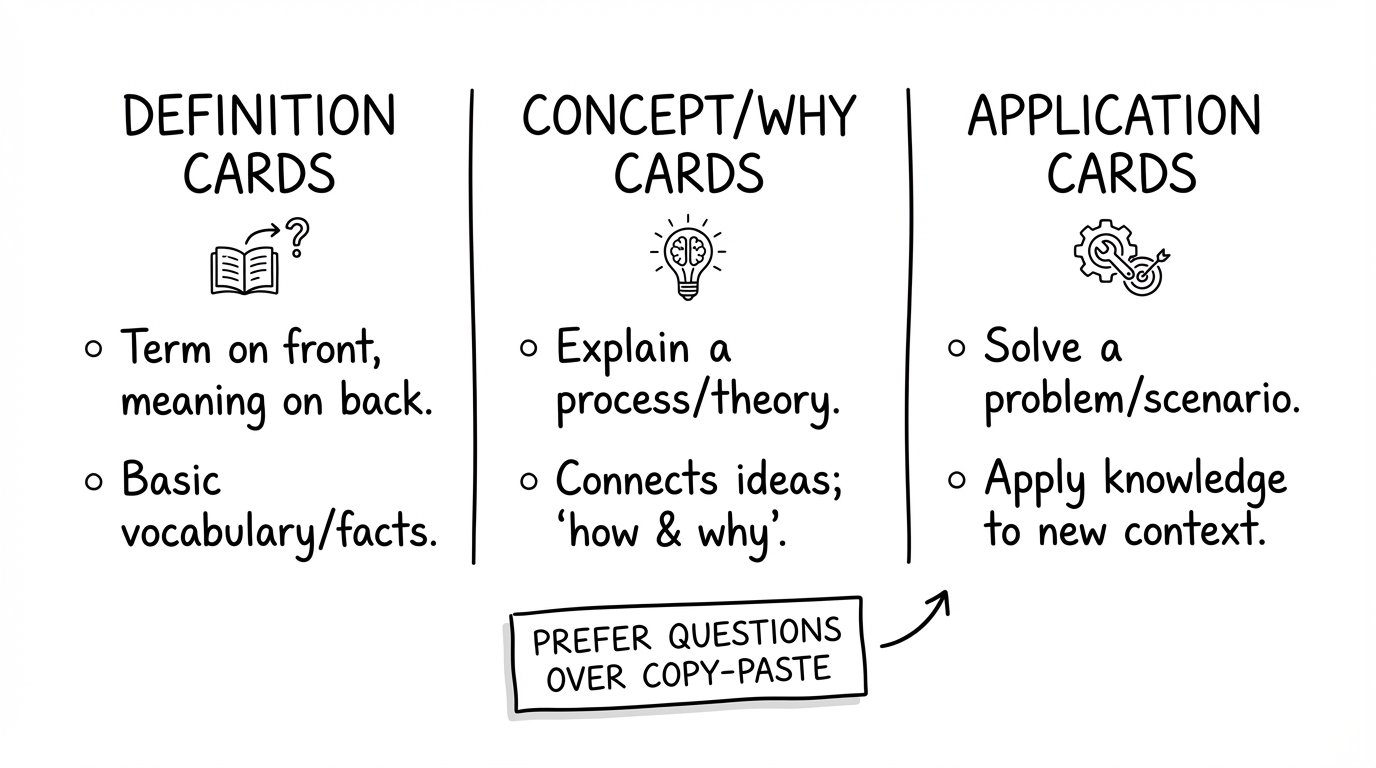
Definitions are fine — but understanding and application cards drive exam performance.
1) Definition cards (quick wins, limited depth)
Good for: terms, laws, models, abbreviations.
Example:
- Q: What is a confidence interval?
- A: A range computed from sample data that is likely (e.g., 95%) to contain the true parameter value.
Common mistake: only definitions. Fix: add at least one “when/why” card per concept.
2) Concept / “why” cards (high learning value)
Good for: mechanisms and relationships.
Example:
- Q: Why does regularization reduce overfitting?
- A: It penalizes complexity (large weights), which discourages the model from fitting noise and improves generalization.
3) Application / transfer cards (most exam-like)
Good for: typical problem types, case studies, choosing methods.
Example:
- Q: When should you use a chi-square test?
- A: When you test whether observed category counts differ from expected counts (categorical data).
- Essay cards: “Explain chapter 4” — that’s not a flashcard.
- Copy/paste cards: huge answers train reading, not retrieval.
- Ambiguous prompts: if the question can be interpreted in multiple ways, review becomes frustrating.
Workflow 1: manual (fast and accurate)
Manual creation is underrated. If you keep cards small, you get extremely accurate material — and the creation process itself is active learning.
Steps:
- work in chunks (10–20 pages)
- select 1–3 key ideas per page
- create 1 question per idea
- answer in 1–4 sentences (or a formula)
- test 10 cards immediately
Creating too many cards. The goal is not “convert everything”, but “make the exam-relevant parts retrievable”.
Workflow 2: semi-automated (copy/paste + AI)
Here AI is a wording assistant, not a truth engine. You paste small sections and ask for well-structured cards.
Best use cases:
- clean definitions and explanations
- lists and comparisons
- turning textbook-style prose into questions
Process:
- paste 1–2 paragraphs (not 30 pages)
- specify the card types and constraints
- verify against the PDF
- edit and tag
Workflow 3: fully automated (upload PDF → AI cards)
If your tool supports PDF upload, you avoid formatting issues. But it only works reliably if you add two guardrails:
- scope (chapter-level, not everything)
- quality gate (every card must be traceable to the PDF)
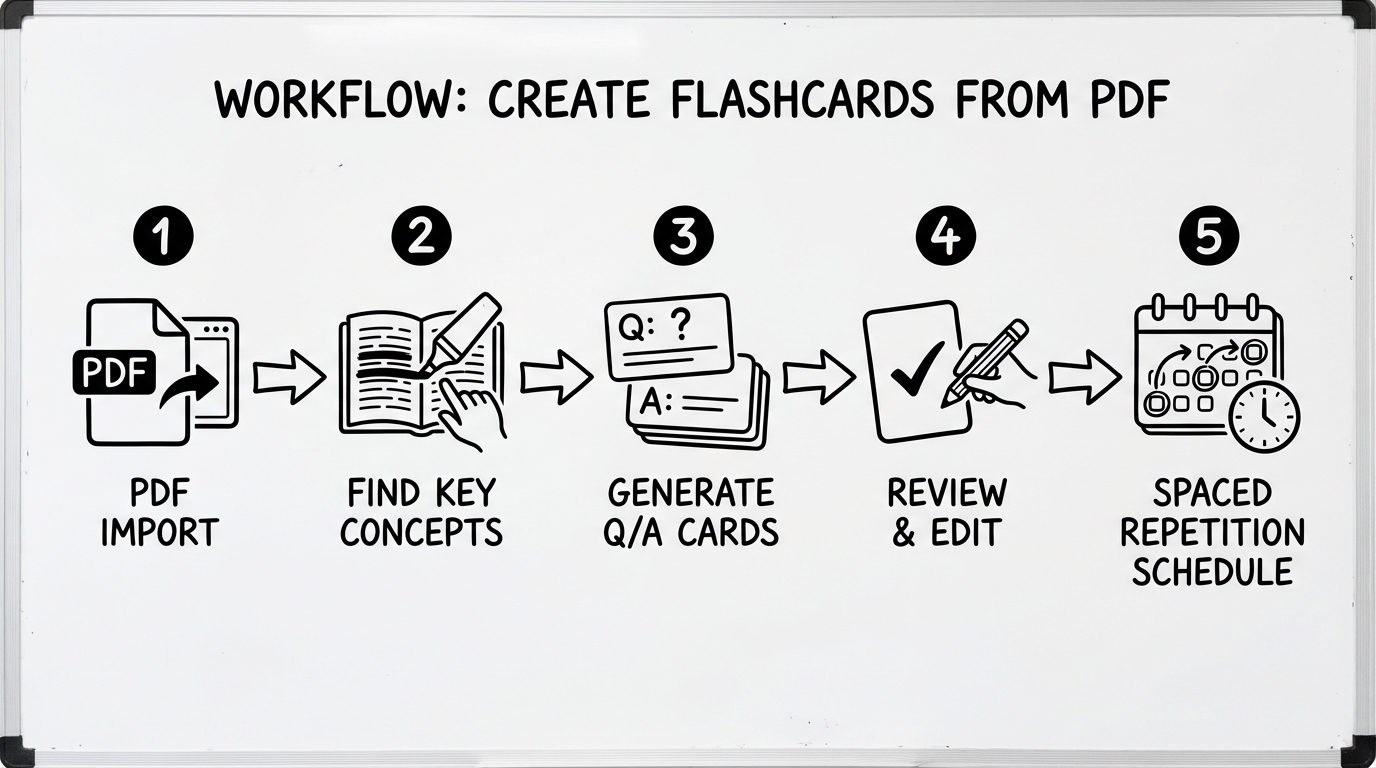
Generation is easy. Review + repetition is what makes it work.
A practical okti workflow
Many students use okti like this:
- upload a PDF (lecture notes, slides, paper)
- generate flashcards from the PDF
- quick review: delete obvious mistakes, rewrite unclear questions
- add tags (e.g., course, chapter, exam)
- review 10–30 minutes daily
Two okti features make the quality gate fast: every generated card keeps a “View source” link to the exact page in the PDF, and an Explain button explains the answer in simple words with reference to the document. You can also open the PDF in okti’s viewer and chat with the document while you check unclear cards.
Stop copy/pasting PDFs into tools
okti turns PDFs into flashcards and puts them into a spaced repetition workflow — so you can spend time learning, not formatting.
start with oktiQuality gate: how to avoid wrong flashcards
AI can be wrong. If you import blindly, you might memorize hallucinations. So treat verification as part of the workflow.
7 rules that almost always work
- one card = one fact or principle
- short answers (otherwise it’s not a flashcard)
- avoid vague words without context
- verify numbers, formulas, dates
- keep terminology consistent
- application cards should include a tiny scenario
- if the question is unclear, rewrite it
- Can I understand the question in 5 seconds?
- Can I answer in 20–60 seconds?
- Is the answer unambiguous?
- Is it exam-relevant?
- Could I point to a source section in the PDF?
Anki export: formats, fields, tags
A common setup is PDF → AI → Anki. It works best with a clean import format.
Useful formats
- CSV/TSV (simple, robust)
- APKG (convenient but tool-dependent)
- Markdown (okay for manual copy/paste)
Recommended fields
- Front (question)
- Back (answer)
- Tags (course / chapter / pdf)
- Optional: Source (page/section)
A “Source” field like “slides p. 17” saves tons of time when you need to verify or extend a card later.
Tool comparison (2026): okti vs Anki vs “AI + Anki” setups
You basically have three options:
- Anki only (manual creation, maximum control)
- AI + Anki (fast generation, requires review + import)
- end-to-end workflow (upload PDF → cards → review with spaced repetition)
| Tool | PDF upload | AI flashcards | Spaced repetition | Export (CSV etc.) | Setup effort |
|---|---|---|---|---|---|
| oktiEmpfohlen | Yes | Yes | Yes | Yes | Very low |
| Anki (manual) | No | No | Yes | Yes | Medium |
| AI chat + Anki | sometimes | Yes | Yes | manual | High |
- Upload PDFs → generate cards
- Review with spaced repetition
- Tagging + organization
- Maximum control
- Excellent algorithm
- PDF → cards is manual work
- Generate lots of cards quickly
- Quality varies
- Usually extra import/setup
Best prompts (copy/paste) for PDF-based flashcards
Use these prompts in any AI chat when you paste a small excerpt from your PDF.
Prompt 1: mixed set (definitions + why + application)
Create 15 flashcards from the text below. Rules:
- Format:
Q: .../A: ...- Answers max 1–4 sentences
- At least 5 “why/how” questions
- At least 5 application questions (include a mini scenario)
- Don’t copy sentences verbatim; rewrite in your own words
- If anything is uncertain: write
UNCERTAINand ask a follow-up question
Prompt 2: oral exam style
You are an examiner. Create 10 oral exam questions from the text and provide a model answer (2–4 sentences). Focus on common pitfalls and boundary cases.
Prompt 3: Anki import (TSV)
Output a TSV table with columns
Front<TAB>Back<TAB>Tags. Tags:pdf chapter-3.
Always verify cards against the PDF — especially numbers, formulas, dates, and definitions.
Example: turn 1 PDF page into 10 great flashcards
Imagine your PDF has a typical page on “hypothesis testing”. A common approach is to create only definition cards (p-value, alpha, type I error…). That’s a start — but it won’t fully prepare you for exam-style questions.
Step 1: extract 3 core claims (your own notes):
- testing is decision-making under uncertainty
- α controls type I error; β/power relates to type II error
- a p-value is not the probability that H0 is true
Step 2: create a mixed set of cards
-
Definition
- Q: What does the significance level α mean?
- A: α is the maximum acceptable probability of a type I error (rejecting H0 when it’s true).
-
Mechanism / why
- Q: Why does choosing a smaller α often increase β (type II error)?
- A: Stricter rejection thresholds make it harder to reject H0, so true effects are more likely to be missed.
-
Application
- Q: You test at α=0.01 and get p=0.03. What’s the decision?
- A: Do not reject H0 (p > α).
-
Misconception check
- Q: What is a p-value not?
- A: It’s not the probability that the null hypothesis is true.
-
Transfer
- Q: When would you choose a smaller α (0.01 vs 0.05)?
- A: When a false positive is costly or dangerous (e.g., medicine, safety).
This style produces fewer cards — but each card carries more exam-relevant “retrieval value”.
7-day mini plan: make sure the flashcards actually get reviewed
Generating cards is easy. Reviewing consistently is what turns them into grades.
- Day 1: scope the PDF (10–20 pages) + create 20–30 cards
- Day 2: first review + rewrite 10 unclear cards
- Day 3: second review + add 10 application cards
- Day 4: review + create a tiny quiz (5 problems) from your cards
- Day 5: review + build a “top 10 weak spots” list
- Day 6: review + mixed session (old + new)
- Day 7: closed-book self-test + final polish
If you only have 10 minutes: review old cards. Don’t generate new ones.
Troubleshooting: common issues (quick fixes)
- “My cards are too long.” → shorten answers, split big cards, 1 idea per card.
- “AI invents details.” → reduce scope, add a source field, delete anything not clearly supported.
- “I memorize wording but don’t understand.” → add more “why/how” and application cards.
- “Too many cards, I can’t keep up.” → cap new cards (e.g., 20/day) and keep only exam-relevant ones.
Read next: the same workflow also works for videos — see create flashcards from YouTube videos — or start with the basics in our free AI flashcard generator guide.
FAQ: create flashcards from PDF with AI
1) Can I do this for free?
Yes with manual creation (Anki). AI workflows are often partially free but get limited quickly for large PDFs.
2) Does it work with scanned PDFs?
Yes, but you need OCR (text recognition). Without it, models tend to guess more.
3) How many flashcards should I create from 20 pages?
A useful range is 20–60 cards, depending on density. Prefer fewer, higher-quality cards.
4) What’s better: summaries or flashcards?
Summaries help structure understanding; flashcards help retention. A strong combo is: quick overview → flashcards for retrieval.
5) What flashcard types work for math/stats PDFs?
Focus on application cards: when to use which formula/test, interpretation, common traps. Pure formula memorization is fragile.
6) How do I prevent AI hallucinations?
Keep scope small, verify every card, add a source field, and delete anything that isn’t clearly supported by the PDF.
Conclusion
Turning PDFs into flashcards is one of the highest ROI study upgrades you can make. Pick a workflow that matches your time and your tolerance for manual work:
- manual for maximum precision
- semi-automated for speed with control
- fully automated for the biggest time savings
If you want the fastest path without losing quality: use a PDF upload workflow, run a quick quality gate, and review consistently.
One last tip: keep your decks organized by course and chapter, and add tags like midterm or final early. Clean structure makes daily reviews easier — and lowers the chance you abandon spaced repetition when the semester gets busy.
Ready to turn your PDFs into real study material?
Try okti for free and convert lecture notes & slides into flashcards — with spaced repetition included.
try okti for free