Knowt Alternative 2026: 9 Better Options for Flashcards, AI Summaries, and Faster Studying
Looking for a Knowt alternative? This guide compares 9 strong options for 2026 with a quick comparison table, pros/cons, feature and pricing breakdowns, and practical recommendations for students.
Knowt Alternative 2026: 9 Better Options for Flashcards, AI Summaries, and Faster Studying

Knowt became popular as a free Quizlet-style tool, and for many students it’s still a solid starting point. But in 2026, more students are actively searching for alternatives. The reasons are practical: better AI workflows, more reliable retention systems, and less friction between course materials and daily revision.
This guide is built for real student workflows, not just feature marketing. You’ll get:
- a table of contents for quick navigation
- a quick comparison table
- pros and cons for each alternative
- feature and pricing comparison tables
- clear recommendations by study style
- FAQ with common migration and workflow questions
Table of Contents
- When is a Knowt alternative worth it?
- Quick Comparison: 9 Best Knowt Alternatives in 2026
- 1) okti — turn your course files into study-ready flashcards in minutes
- 2) Anki — maximum control, steeper learning curve
- 3) Quizlet — simple and popular, but limited in free plans
- 4) RemNote — strong for connected knowledge
- 5) StudySmarter — familiar all-in-one platform approach
- 6) NotebookLM — excellent at synthesis, weaker for daily drills
- 7) Obsidian + plugins — DIY stack for advanced users
- 8) Goodnotes/Notability + AI workflow — great for visual learners
- 9) Moodle/Canvas + okti workflow — highly practical and underrated
- Feature comparison
- Pricing comparison
- FAQ
- Conclusion: what is the best Knowt alternative?
When is a Knowt alternative worth it?
A switch is usually worth it when one or more of these applies:
- You need to move from materials to active revision faster.
- You want better AI support (PDF -> summary -> flashcards).
- You need better control over scheduling, card types, or export.
- You want a repeatable study system instead of ad-hoc sessions.
The best Knowt alternative is often not one app. It’s a workflow: collect trusted materials, convert them with AI, and review with active recall + spaced repetition.
Quick Comparison: 9 Best Knowt Alternatives in 2026
| Tool | Free plan | AI summaries | Flashcards | Spaced repetition | Export flexibility |
|---|---|---|---|---|---|
| oktiEmpfohlen | Yes | Yes | Yes | Yes | solid |
| Anki | Yes | No | Yes | Yes | strong |
| Quizlet | Yes | Yes | Yes | partial | limited |
| RemNote | Yes | Yes | Yes | Yes | good |
| StudySmarter | Yes | Yes | Yes | Yes | medium |
| NotebookLM | Yes | Yes | indirect | No | medium |
| Obsidian + Plugins | Yes | optional | Yes | Yes | strong |
| Goodnotes/Notability | No | optional | indirect | No | good |
| Moodle/Canvas + okti | Yes | Yes | Yes | Yes | solid |
1) okti — turn your course files into study-ready flashcards in minutes
If your goal is to spend less time organizing and more time retaining, okti is one of the strongest Knowt alternatives right now. The core advantage is speed with relevance: start with your real lecture files, then generate outputs you can review right away.
Pros
- AI-assisted summaries directly from PDFs
- fast flashcard generation from course content
- AI Chat (beta): chat with your own documents, notes, and decks — it can create flashcards, quizzes, and notes on request (you approve every change)
- Tutor mode: a personal AI tutor that builds a personalized lesson path toward your learning goal
- active recall and review flow built into the process
- practical fit for university timelines
Cons
- output quality depends on input quality (clean PDFs work best)
- users wanting deep rule-level deck control may still prefer Anki
From lecture slides to revision cards, fast
Try okti for free and generate summaries + flashcards from your own study materials.
Try okti free2) Anki — maximum control, steeper learning curve
Anki remains the benchmark for customizable spaced repetition. If you like building your own system, it’s excellent.
Pros
- highly configurable scheduling
- massive plugin ecosystem
- strong portability and long-term control
Cons
- technical setup overhead for many students
- no native frictionless “PDF in -> structured study set out” workflow
3) Quizlet — simple and popular, but limited in free plans
Quizlet is easy to adopt and great for quick entry, especially in group contexts.
Pros
- very accessible UI
- easy set creation and sharing
- lots of public content
Cons
- key features can be paywalled
- public set quality varies significantly
If Quizlet’s paywalls put you off too, check our free Quizlet alternatives for 2026.
4) RemNote — strong for connected knowledge
RemNote is compelling for subjects that depend on conceptual links rather than isolated facts.
Pros
- combines notes and flashcards in one graph-like structure
- supports durable conceptual learning
- solid built-in repetition model
Cons
- complexity can slow down onboarding
- workflow is not instantly intuitive for everyone
Read next: our dedicated guide to the best RemNote alternatives in 2026.
5) StudySmarter — familiar all-in-one platform approach
StudySmarter is widely used in Europe and covers common student workflows.
Pros
- broad adoption among students
- notes, cards, plans in one place
- straightforward collaboration features
Cons
- platform constraints for highly custom workflows
- may be less precise for niche module structures
6) NotebookLM — excellent at synthesis, weaker for daily drills
NotebookLM is strong for understanding and synthesis, especially with long or complex source sets.
Pros
- very strong source-grounded summarization
- useful for framing difficult topics quickly
Cons
- not a full daily flashcard drill system on its own
- usually needs a second tool for long-term retention practice
If you like NotebookLM’s source-grounded chat but also want daily drills, note that okti’s AI Chat (beta) now offers both: chat over your own documents plus flashcards and spaced repetition in the same app. See also our NotebookLM alternatives for 2026.
7) Obsidian + plugins — DIY stack for advanced users
For system builders, Obsidian is extremely flexible and future-proof.
Pros
- local markdown control
- long-term knowledge base potential
- powerful plugin ecosystem
Cons
- setup and maintenance cost
- more “build your own” than turnkey student tool
8) Goodnotes/Notability + AI workflow — great for visual learners
If your study style depends on handwriting, sketching, and visual structures, these apps are excellent companions.
Pros
- top-tier tablet and stylus experience
- strong for diagrams and handwritten memory cues
Cons
- no native spaced repetition core
- AI workflows typically indirect and fragmented
9) Moodle/Canvas + okti workflow — highly practical and underrated
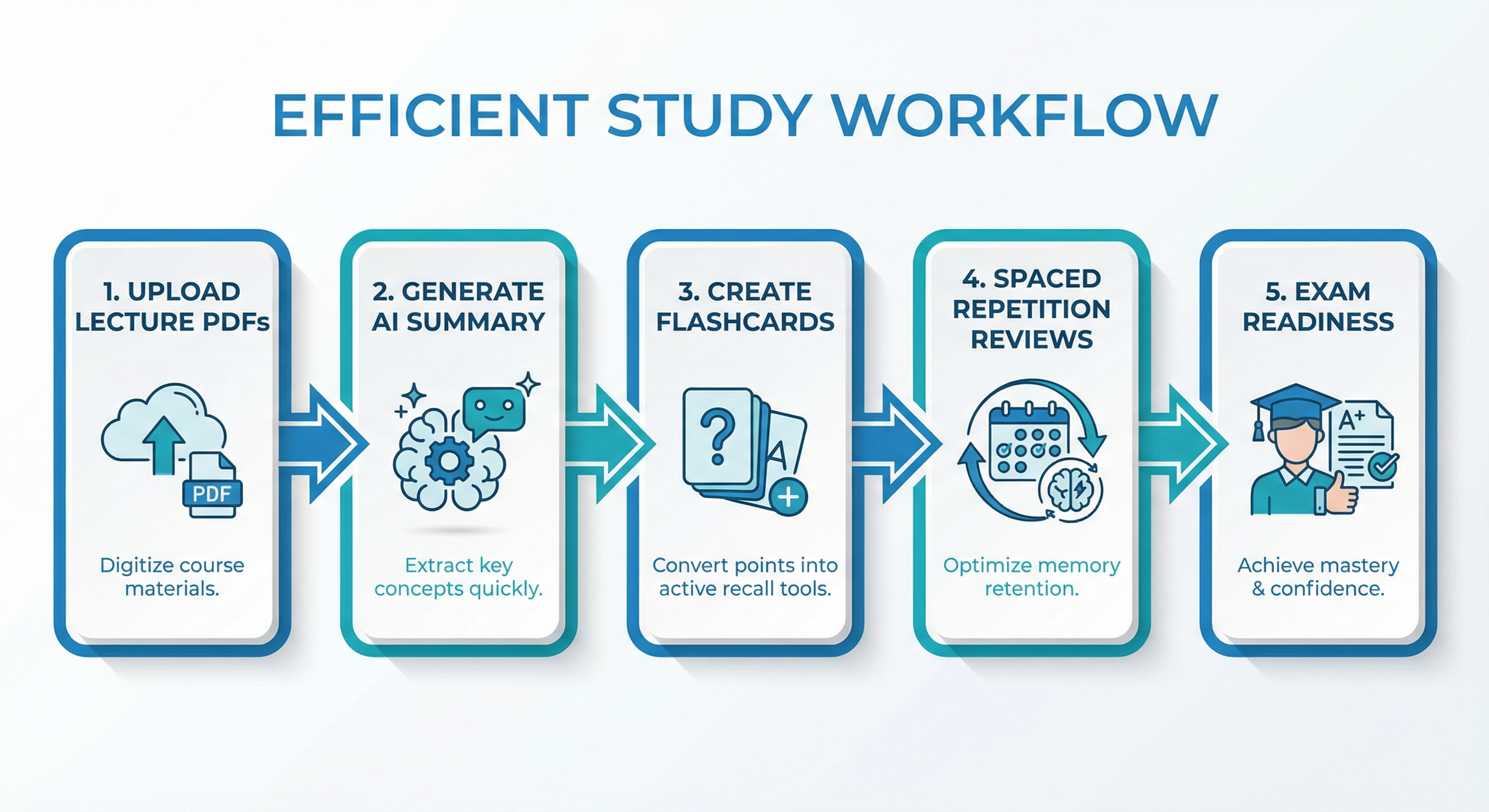
Most exam-relevant material already lives in your official course platform. Pairing that with okti creates a clean and repeatable pipeline.
Workflow
- Export weekly lecture PDFs/slides from Moodle or Canvas.
- Upload to okti and generate structured summaries.
- Create flashcards from key concepts and exam-style details.
- Review daily in short, consistent sessions.
- Tag weak cards and rework targeted gaps.
20–30 minutes of daily active recall usually beats irregular multi-hour cram sessions.
Feature comparison
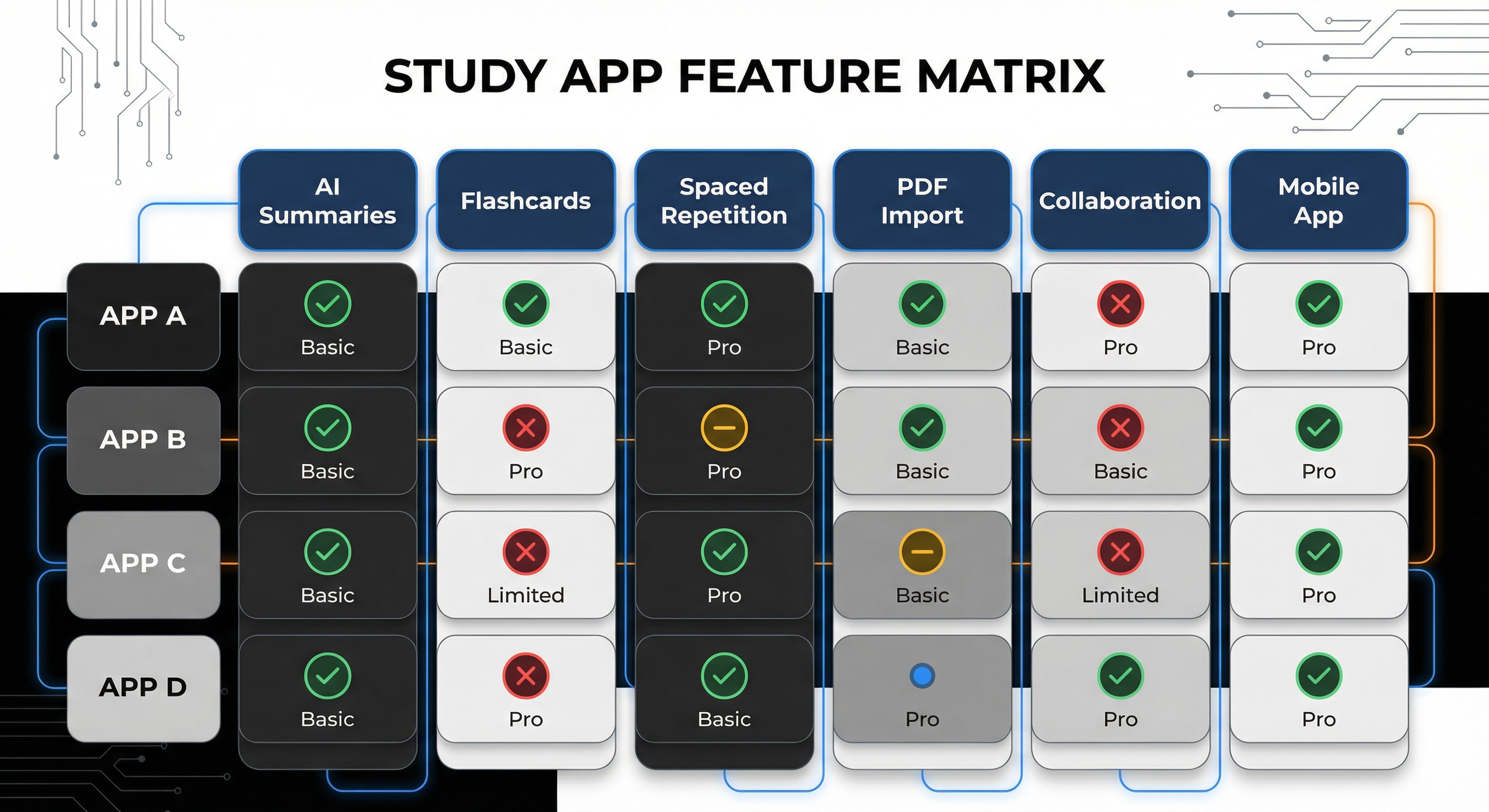
| Tool | AI PDF import | Flashcards | Spaced repetition | Collaboration | Best fit |
|---|---|---|---|---|---|
| okti | Yes | Yes | Yes | Partial | Fast university workflow |
| Anki | No (plugins needed) | Yes | Yes | Limited | Power users |
| Quizlet | Partial | Yes | Partial | Yes | Quick onboarding |
| RemNote | Yes | Yes | Yes | Yes | Connected knowledge learning |
| StudySmarter | Yes | Yes | Yes | Yes | All-in-one preference |
| NotebookLM | Yes | Indirect | No | Partial | Source understanding |
| Obsidian+Plugins | Optional | Yes | Yes | Partial | Custom systems |
Pricing comparison
| Tool | Free plan | Typical paid level | Value for students |
|---|---|---|---|
| okti | Yes | plan-based | Very strong for PDF-heavy workflows |
| Anki | Yes | low/one-time in many cases | Excellent if you like customization |
| Quizlet | Yes | subscription | Medium to good |
| RemNote | Yes | subscription | Good for concept-heavy topics |
| StudySmarter | Yes | subscription/upgrades | Medium |
| NotebookLM | Yes | workspace dependent | Good for synthesis |
A practical Knowt alternative for real exam prep
With okti, you can transform course material into summaries and flashcards designed for actual retention.
Start with oktiHow to choose the right alternative (without app-hopping)
Most students compare tools by interface and miss the metric that actually matters: retention under exam pressure. Use this three-layer framework instead.
Layer 1: Subject fit
- Fact-heavy subjects (anatomy, vocabulary, legal definitions): flashcard-first systems are ideal.
- Concept-heavy subjects (psychology, economics, social sciences): note + card systems often work better.
- Problem-solving subjects (math, physics, engineering): flashcards support concepts, but problem sets remain essential.
Layer 2: Setup tolerance
- If you dislike setup, prioritize a turnkey workflow.
- If you enjoy optimization, you can extract more from customizable systems.
- If you are time-constrained, choose the fastest pipeline from source material to review items.
Layer 3: Exam alignment
Your core question should be: Will this system measurably improve my next 7 days of prep?
A practical exam-aligned flow:
- Prioritize source materials (exam-relevant first)
- Compress to key ideas and prompts
- Review daily with active recall
- Track weak cards and revisit
- Add transfer practice with exercises or past papers
14-day migration plan from Knowt
You do not need a big-bang migration. A staged transition is usually faster and safer.
Days 1–2: audit
- Identify active decks only.
- Archive outdated or duplicate cards.
- Rank courses by exam urgency.
Days 3–4: pilot build
- Choose one high-priority course.
- Build 50–120 quality cards in the new tool.
- Validate card format, review rhythm, and friction.
Days 5–7: compare outcomes
Track side-by-side metrics:
- cards reviewed/day
- review completion rate
- error rate on difficult cards
- perceived cognitive load
Days 8–10: stabilize structure
- standardize tags/folders
- define card templates (definition, cloze, application)
- lock daily review time blocks
Days 11–14: scale
- migrate a second course
- keep archive decks separate
- run a short retrospective on what actually saved time
Move high-impact, near-exam content first. Archive migration can happen later.
Common mistakes when switching from Knowt
-
Volume over quality
- More cards are not automatically better.
- One card should test one clear, exam-relevant idea.
-
Passive reading disguised as studying
- Summaries are preparation, not retention.
- Without recall practice, memory decay is fast.
-
No error strategy
- Tag difficult cards.
- Diagnose error type (concept confusion, missing context, formula recall, etc.).
-
No weekly routine
- Most failures are routine failures, not feature failures.
- Fixed review slots beat motivation spikes.
-
Ignoring exam format
- If your exam tests transfer, pure definition cards are insufficient.
- Add application cards and mini-case prompts.
Flashcard quality checklist
Before saving a card, verify:
- Is the prompt unambiguous?
- Is the answer short and precise?
- Does it test understanding, not just wording?
- Is source context clear (module/chapter/topic)?
- Can it be answered in ~30 seconds?
If you fail 3+ checks, rewrite the card.
Best alternative by learner type
Type A: “I want almost zero setup”
Best fit: Quizlet/StudySmarter or a direct okti start.
Type B: “I need output directly from lecture files”
Best fit: okti.
Type C: “I enjoy building systems”
Best fit: Anki or Obsidian plugin stack.
Type D: “I learn via conceptual networks”
Best fit: RemNote.
Type E: “I learn visually with handwriting”
Best fit: Goodnotes/Notability plus a dedicated flashcard layer.
One-sentence summary
The best Knowt alternative is the one that turns your real course material into consistent daily active recall—and for many students in 2026, okti is the most practical way to do that.
Deep practical comparison: what actually matters during a semester
Time to first active review
The most useful metric is not total feature count. It is the time from source material to first active recall session.
- Traditional flashcard setups can delay this step due to manual structure work.
- Workflow-first systems like okti reduce this delay by turning source files into immediate review assets.
Faster first review generally means lower forgetting between lectures and exam period.
Card quality for complex topics
Not all systems handle difficult content equally well, especially for:
- definitions with conditions and exceptions
- formulas plus interpretation
- similar concepts requiring contrast-based prompts
In practice, clean source material quality strongly determines output quality. Students often underestimate how much poor scan quality hurts card usefulness.
Friction and motivation
Most study systems fail because of friction, not because they lack features:
- too many steps
- unclear organization
- inconsistent cross-device routines
The best alternative is the one you still use during a stressful week.
Portability and long-term resilience
A smart choice balances two horizons:
- Short-term: better exam outcomes
- Long-term: reusable knowledge assets
That is why export options, tagging systems, and clear structure should be evaluated early.
Group study vs. solo flow
Collaborative tools are helpful for shared planning and resource exchange. But high-performance revision is often a solo routine with strict focus windows. A hybrid model works best for many students: group coordination, individual recall practice.
Exam-style cards vs. dictionary cards
Many decks underperform because they are built like mini dictionaries. For better transfer performance, include:
- application prompts
- error-diagnosis cards (“why was this solution wrong?”)
- decision cards (“which method applies in this scenario?”)
These card types improve reasoning under exam constraints.
30-day implementation recommendation
If you are undecided, use this simple execution plan:
- Pick one primary tool.
- Lock one daily 25-minute review block.
- Import only exam-relevant sources.
- Create at least 120 high-quality cards per week.
- Run a Sunday review and adjust your pipeline.
This turns a tool decision into a real learning operating system.
FAQ
No. Knowt can be useful, especially for quick setup. But if you need better PDF workflows, deeper review control, or more consistent results, alternatives can be a better fit.
It depends on your style. Anki is best for customization, Quizlet/StudySmarter for simple onboarding, and okti for practical AI-driven conversion from your own course files.
A workflow usually wins over a single app: official course files + AI summaries + active recall review. This is where okti performs especially well.
Usually yes, depending on export support. Move active decks first, keep archived sets for later, and test your spacing workflow before full migration.
Method. Active recall, consistent spaced repetition, and focused weak-point review matter more than brand choice alone.
For most students, 20–30 minutes daily is realistic and highly effective. Consistency beats intensity.
Conclusion: what is the best Knowt alternative?
If you want extreme control, choose Anki. If you want social and easy onboarding, choose Quizlet or StudySmarter. If you want concept networks, choose RemNote.
If you want a practical exam-first workflow from real course documents to retention-focused outputs, okti is one of the best Knowt alternatives in 2026.
The real win is not just creating cards. It is running a repeatable learning loop:
- import trusted material
- extract key ideas
- generate usable cards
- review consistently
- close weak areas before exams
That is how you move from “I read a lot” to “I can recall it under pressure.”