RemNote Alternative 2026: 10 best alternatives for flashcards, notes & AI studying
Looking for a RemNote alternative? We compare 10 tools for flashcards, spaced repetition, note-taking, PDFs and AI — with practical selection criteria, workflows and migration tips.
RemNote Alternative 2026: 10 best alternatives for flashcards, notes & AI studying

RemNote is popular because it combines notes, flashcards, PDFs and spaced repetition in a single app — plus (depending on your plan) AI study features and mobile apps. For many students, that “all-in-one” feeling is exactly the point.
But it’s also why people look for a RemNote alternative:
- you want faster ways to turn PDFs/slides into flashcards,
- you want more SRS control (or a simpler system),
- you want local files and less lock-in,
- or you want a different balance between note-taking and reviewing.
This guide is designed to help you decide quickly, based on your real workflow — not on hype.
Turn PDFs into flashcards — without copy & paste
With okti you upload lecture slides or scripts and generate ready-to-review flashcards in minutes.
try okti for freeTable of contents
- Quick verdict: which RemNote alternative should you pick?
- Why people switch from RemNote
- What makes a great RemNote alternative in 2026?
- Quick comparison: 10 alternatives at a glance
- Decision guide: pick the right tool for your workflow
- The 10 best RemNote alternatives (deep dive)
- Feature trade-offs: notes, SRS, PDFs, AI, offline & privacy
- Practical study workflows (that actually stick)
- Migration: switching from RemNote without breaking your routine
- FAQ
Quick verdict: which RemNote alternative should you pick?
If you want the shortest answer:
- Your main input is PDFs/slides and you want flashcards fast: okti.
- You want maximum spaced-repetition control and you don’t mind setup: Anki.
- You want local Markdown notes + backlinks + a “second brain” system: Obsidian (with an SRS plugin).
- You want a flexible workspace for planning + notes and SRS is secondary: Notion.
Everything else in this article is about matching the tool to your constraints.
Why people switch from RemNote
RemNote is a strong “one tool for everything” app. The problem is: different students need different “everything”.
Common reasons (real-world)
- Friction in flashcard creation
In many degrees, the workflow is PDF-heavy: slides, scripts, lecture notes. If turning that into cards is slow, you end up with too few cards — and spaced repetition can’t help if you don’t have reviewable items.
- SRS control and review overload
SRS isn’t just “review cards”. The details matter: limits, intervals, leech handling, custom card types, and daily workload planning. Some learners want more control than all‑in‑one apps offer; others want less complexity.
- Local files & ownership
Some students want their notes as local Markdown files on their device. It’s not just privacy — it’s also longevity and portability.
- Notes as knowledge system
If you care about backlinks, tags and building a long-term knowledge base, dedicated note apps (Obsidian/Logseq) can feel more natural than study apps.
- Simplicity
A surprising number of successful students do better with a minimal tool: flashcards + daily reviews. Less feature surface area means fewer excuses.
What makes a great RemNote alternative in 2026?
A good alternative improves what actually moves grades: consistency, review quality, and time-to-first-review.
1) Time-to-review (the most underrated metric)
If a tool helps you get from “I have a PDF” to “I’m reviewing good cards today” quickly, it wins.
Small frictions compound:
- +10 seconds per card → hours wasted across a semester
- extra steps per review → broken routines
2) It nudges you toward good card design
Most “SRS problems” are actually card problems:
- too long,
- too vague,
- multiple facts per card,
- not testable.
A great system makes it easy to write short, atomic cards (and to edit them later).
3) Review load is controllable
In exam periods, you need to steer:
- new cards vs due cards,
- daily caps,
- focus by topic/module.
4) It matches your input format
PDFs and slides require different tooling than “I write daily notes” workflows.
5) Offline & privacy (if you care)
Decide early: cloud-first convenience vs local-first ownership.
Spaced repetition schedules reviews so you see a concept again right before you would forget it. Done well, it reduces study time and improves long‑term retention compared to cramming. Full explanation in our spaced repetition guide.
Quick comparison: 10 alternatives at a glance
| Tool | Notes | Spaced repetition | PDFs/slides | AI help | Offline | Local files |
|---|---|---|---|---|---|---|
| oktiEmpfohlen | Yes | Yes | Yes | Yes | No | No |
| Anki | No | Yes | No | No | Yes | Yes |
| Obsidian + SRS | Yes | Yes | Yes | No | Yes | Yes |
| Notion (+ workflow) | Yes | partial | ok | Yes | No | No |
| Quizlet | No | light | No | Yes | partial | No |
| Mochi | light | Yes | No | No | Yes | Yes |
| SuperMemo | yes | Yes | indirect | No | Yes | Yes |
| Logseq | Yes | via plugins | indirect | No | Yes | Yes |
| OneNote/GoodNotes + SRS | Yes | external | Yes | No | Yes | partial |
| Analog + digital | Yes | manual | No | No | Yes | Yes |
There’s no universal “best app”. The right choice depends on what you want to optimize: flashcards, notes, PDF learning, or ownership/local storage.
Decision guide: pick the right tool for your workflow
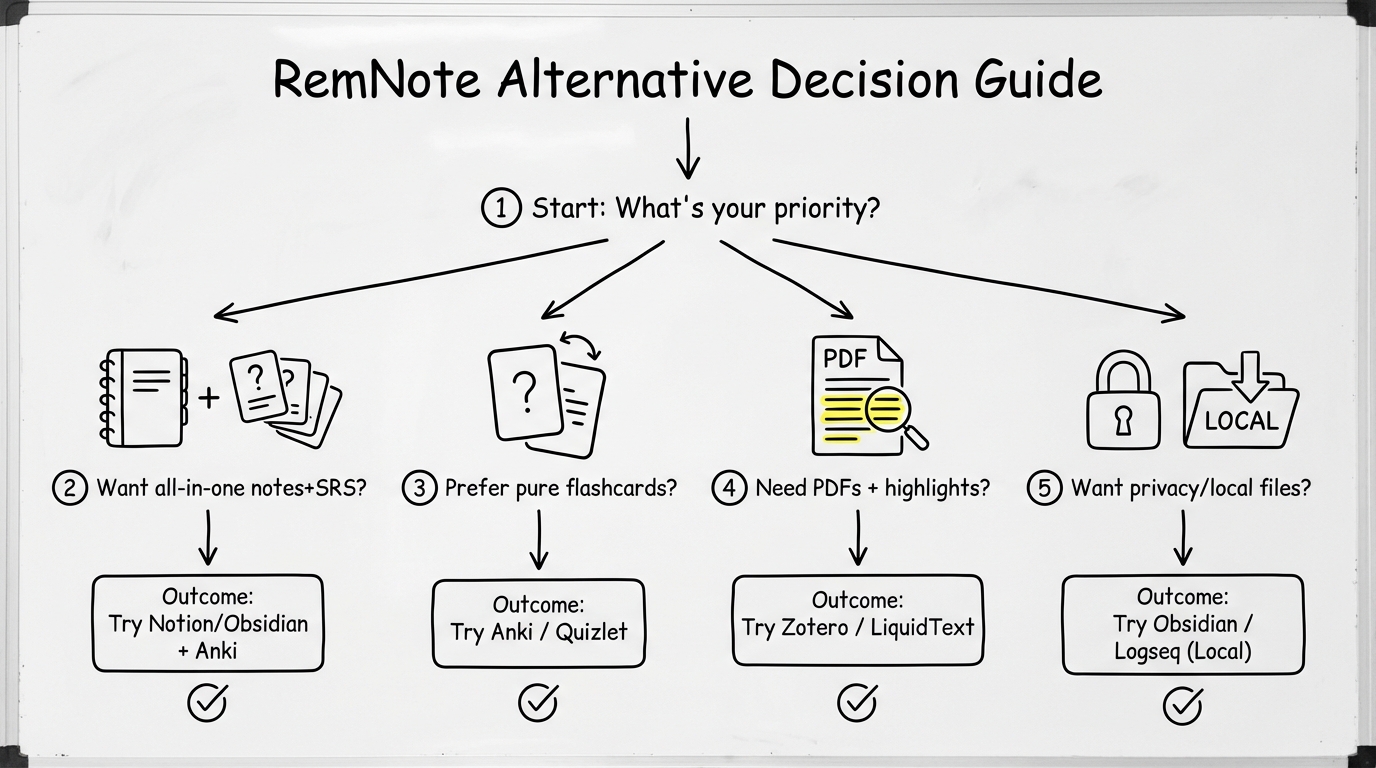
If you’re unsure, decide by your main input and your tolerance for setup.
Ask yourself four questions:
- What’s your main input? PDFs/slides, lectures, textbooks, videos?
- How much do you care about SRS control? (limits, intervals, custom card types)
- Do you want notes as a long-term knowledge base? backlinks, tags, graph?
- Cloud-first or local-first?
Typical outcomes:
- PDFs/slides + fast flashcards → okti
- maximum SRS control → Anki or SuperMemo
- local notes + linked thinking → Obsidian or Logseq
- workspace planning + notes → Notion
The 10 best RemNote alternatives (deep dive)
1) okti (AI flashcards from PDFs)
okti is a RemNote alternative if your goal is clear: turn study material into reviewable flashcards quickly.
Best for
- students learning from PDF scripts, lecture slides, handouts,
- anyone who wants to reduce the manual work of card creation,
- learners who want a simple “input → cards → daily review” routine.
Strengths
- built around the PDF/slide workflow,
- AI support to draft flashcards that are easier to review,
- rich-text notes too — including AI-generated summaries from your files,
- AI Chat (beta): ask questions grounded in your own documents, notes and decks; the chat can create flashcards, quizzes and notes on request (you approve every change),
- Tutor mode: a personal AI tutor that builds a personalized lesson path toward your learning goal,
- keeps the focus on output (cards + reviews), not on building a complex note system.
Limitations
- if you want a huge interconnected note graph, a note app like Obsidian/Logseq is a better fit,
- if you want deep SRS customization (templates, add-ons, fine-grained scheduling), Anki is still the benchmark.
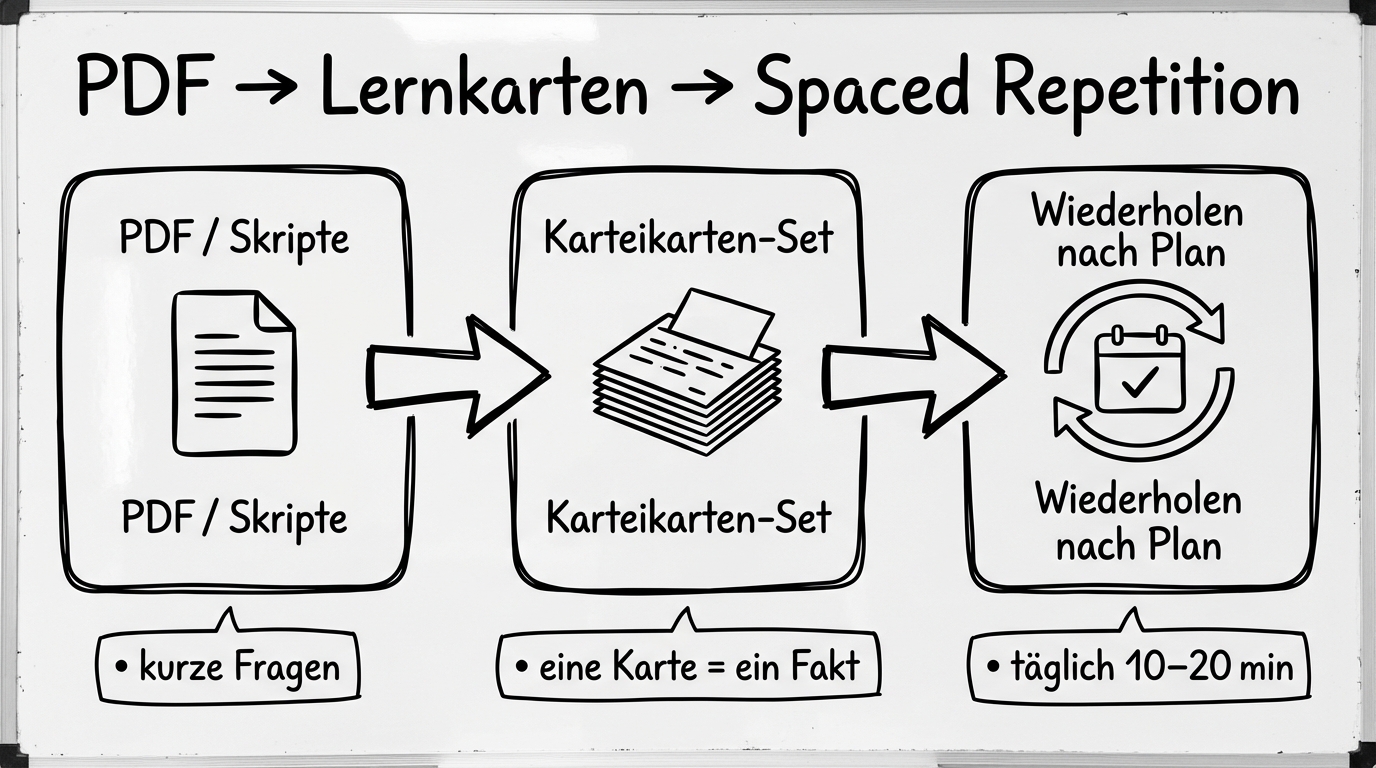
A workflow that works under exam pressure: material → questions → consistent daily reviews.
30-minute starter plan
- Upload one chapter or one slide deck.
- Generate a first set of cards.
- Delete or rewrite the worst 10% (too long, too vague).
- Do 10–20 minutes of reviews daily for a week.
Consistency beats any “perfect setup”.
Try the PDF → flashcards workflow
Upload your script and create a focused deck in minutes — so you can start reviewing today.
start with okti2) Anki (maximum control)
Anki is the classic alternative when you care most about spaced repetition. It’s powerful, fast, and endlessly customizable.
Strengths
- robust SRS scheduling and statistics,
- add-ons and templates (Cloze, image occlusion, custom card types),
- works offline and scales to huge collections.
Weaknesses
- learning curve (especially if you customize heavily),
- not a “notes app” — it’s flashcards-first.
Who it’s for
Medical school, law, languages, and any curriculum with lots of facts. Undecided between the two big classics? See our Anki vs Quizlet comparison.
Keep cards atomic: one fact per card. Short prompt, clear answer. This single habit prevents review overload.
3) Obsidian + SRS plugin (local notes + reviews)
Obsidian is a local Markdown note system. With an SRS plugin or a workflow, it becomes a RemNote-like hybrid: notes with links, plus review prompts.
Strengths
- your notes are local files (portable and durable),
- powerful linking/backlinks, templates and plugins,
- offline-first by default.
Weaknesses
- you will spend some time on setup,
- easy to over-engineer (“productivity procrastination”).
If you enjoy building a knowledge base, Obsidian is one of the most compelling alternatives.
4) Notion (flexible workspace, weaker native SRS)
Notion is excellent for organizing semesters: databases, schedules, summaries, projects. As a RemNote alternative, it works best when SRS is not your main lever.
Strengths
- flexible structure,
- sharing and collaboration,
- AI features can help outline and summarize.
Weaknesses
- SRS is not native; it’s usually a workaround,
- offline is limited.
Many “Notion flashcard systems” look beautiful but fail because reviews aren’t frictionless. If SRS is your core strategy, pick a tool built for it.
5) Quizlet (simple, many study modes)
Quizlet is a lightweight alternative if you want to create cards quickly and use multiple practice modes.
Pros: easy start, lots of content.
Cons: less control over SRS; can be shallow for high‑stakes exams. (More options in our Quizlet alternatives roundup.)
6) Mochi (minimalist SRS)
Mochi is interesting if you want a clean, minimalist flashcard tool without the Anki ecosystem.
Pros: fast, focused.
Cons: smaller ecosystem; not an all‑in‑one.
7) SuperMemo (hardcore SRS)
SuperMemo is for SRS enthusiasts. It can be extremely effective, but it’s not the most modern or beginner-friendly.
Pick it if you want maximum SRS depth and don’t care about polish.
8) Logseq (outliner + linked notes)
Logseq is an outliner designed for linked thinking. It can serve as a study system if you like daily notes and structured outlining.
Pros: local-first options, linked pages.
Cons: SRS/flashcards rely on workflows or plugins.
9) OneNote/GoodNotes + separate SRS tool
A pragmatic approach: use a great PDF/handwriting tool for lecture notes (GoodNotes/OneNote) and a dedicated flashcard system for reviews.
Pros: best-in-class annotation.
Cons: the “transfer step” can introduce friction.
10) Analog notes + digital reviews
Old school can work: write understanding notes on paper, then convert key facts into digital flashcards.
Pros: deep processing and comprehension.
Cons: requires discipline to create cards regularly.
Feature trade-offs: notes, SRS, PDFs, AI, offline & privacy
Notes: knowledge base vs exam engine
- knowledge base focus: Obsidian/Logseq
- exam engine focus: Anki/okti
- hybrids can work, but they can also become heavy.
SRS quality
- strongest: Anki, SuperMemo
- good but workflow-dependent: Obsidian/Logseq
- “good enough”: many consumer apps
PDFs and slides
If your program is PDF-heavy, ask three questions:
- can you extract structure (chapters/topics)?
- can you turn text into testable questions?
- can you review by topic under exam pressure?
AI: useful when it reduces manual work
AI helps when it drafts cards, proposes questions, and summarizes dense passages — but it doesn’t replace understanding or daily reviews.
Practical study workflows (that actually stick)
Workflow A: PDFs → flashcards → daily reviews
- generate a first deck from a chapter,
- clean up the worst cards,
- review 10–20 minutes daily,
- ramp slowly instead of importing thousands of cards at once.
Workflow B: lecture notes → same-day cards
- take concept-focused notes,
- create 10–20 cards the same day,
- review until the exam.
Workflow C: understanding first, SRS second
For conceptual courses:
- explain the topic in your own words,
- create cards for definitions and applications,
- review over weeks.
Migration: switching from RemNote without breaking your routine
Tool switching usually fails because you try to migrate your entire life in one weekend.
A simple 7-day migration plan
- Day 1–2: pick one target workflow.
- Day 3: migrate only the module you’re currently studying.
- Day 4–5: stabilize the daily review habit.
- Day 6: improve card quality (split, shorten, add examples).
- Day 7: only then consider importing older material.
Don’t migrate everything. Migrate what you’ll actually review in the next 4–6 weeks.
A practical trick: keep RemNote installed for a month as a read-only archive, but do all new studying in your new system. That reduces anxiety, prevents endless exporting, and forces the new routine to become the default.
Pricing & hidden costs (what matters more than the monthly fee)
Study tools usually fall into three pricing models:
- Freemium + subscription
You can start for free, but key features (AI, sync, advanced study modes) may require a plan. This is fine if you actually use the app consistently — but it’s a trap if you keep switching tools because the “free version feels limited”. In that case, the real issue is the workflow, not the price.
- One-time purchase (sometimes per platform)
Some apps charge once for desktop or mobile, sometimes with an optional sync add-on. The advantage is predictable cost and less subscription fatigue.
- Free/open source + community
Tools like Anki (desktop) or local note systems can be very affordable. The trade-off is that you pay with time: setup, plugins, backups and occasionally troubleshooting.
The cost most students ignore: friction
The biggest hidden cost is not money — it’s friction:
- 10 extra seconds per card becomes hours across a semester.
- a few extra clicks per review breaks habits.
So the best “value” is often the tool that gets you into daily reviews with the least resistance.
FAQ
Is RemNote free?
RemNote typically offers a free tier and paid plans for advanced features. For your decision, what matters is whether the free workflow is enough for your current exam phase. Always check the current pricing page.
What is the best RemNote alternative for medical school?
If you need maximum repetition efficiency: Anki is a strong default. If your main input is scripts/PDFs and your bottleneck is card creation time, okti can be a big win.
What if I want local files?
Obsidian is a top choice because it uses local Markdown files by default. Logseq can be a good option if you prefer an outliner style.
Is Notion a real alternative?
For planning and notes: yes. For true SRS: only partially, usually with workarounds. If SRS is your main strategy, pick a tool designed for it.
How many new cards per day is reasonable?
For most students, 10–30 new cards/day is sustainable. More isn’t better if it breaks your review habit.
Cloze vs Q/A cards?
Cloze is great for definitions and precise wording. Q/A cards are often better for understanding and application.
What if SRS stresses me out?
That’s usually a workload issue. Reduce new cards, pause huge imports, and rewrite long cards into smaller ones.
Should I keep notes and flashcards in the same app?
Sometimes yes (less context switching). But many students do better with a best-of-breed split: a great PDF/notes tool for understanding, plus a dedicated SRS tool for reviews. If you often skip reviews, simplify the review step first.
What’s the fastest way to improve my flashcards?
Pick 20 of your worst cards and rewrite them:
- split into smaller cards,
- add a concrete example,
- turn vague prompts into testable questions.
This single cleanup often reduces review time dramatically.
If you’re still undecided, do a simple experiment: pick one tool and commit to it for 14 days. Track only two numbers: (1) minutes reviewed per day, and (2) how often you skipped because the workflow felt annoying. Add a third note: why you skipped (too many steps, unclear cards, too many due reviews, bad mobile experience). After two weeks the “best tool” usually becomes obvious — it’s the one that creates the least resistance and keeps your review load sane.
Your biggest productivity gain is usually not a new app — it’s a routine that pulls you into daily reviews instead of perfect organization. Choose a tool, simplify your workflow, and let repetition do the work.
Start today, benefit tomorrow
Pick the tool you’ll still open next week. Upload one PDF, create a small deck, and commit to 7 days of reviews.
try okti for freeRelated posts
App alternatives
Anki vs Quizlet in 2026: Which Alternative Is Actually Better for Students?
App alternatives
Knowt Alternative 2026: 9 Better Options for Flashcards, AI Summaries, and Faster Studying
App alternatives
StuDocu Alternative 2026: 9 Legal & Free Ways to Get Study Notes, Summaries, and Flashcards