StudySmarter Alternative 2025: The 9 Best Study Apps Compared
Looking for a StudySmarter alternative in 2025? We compare 9 study apps (AI features, flashcards, spaced repetition, pricing) and help you pick the right one.
StudySmarter Alternative 2025: The 9 Best Study Apps Compared

StudySmarter (also branded as Vaia in some markets) is a popular all‑in‑one study app: flashcards, study plans, summaries, and a huge community library. Still, many students search for a StudySmarter alternative 2025 because their needs changed:
- They study from PDF lecture slides and want flashcards fast.
- They want real spaced repetition, not just “review sometimes”.
- They want better AI flashcard generation with fewer hallucinations.
- They want a cleaner workflow with less clutter.
This guide compares the best alternatives in 2025/2026 reality (features move fast). You’ll get a quick table, pros/cons, and a decision framework.
Update: For the latest version of this comparison, see our StudySmarter alternatives for 2026.
Turn PDFs into flashcards in under 60 seconds
okti helps you generate high-quality AI flashcards from your lecture PDFs and then study them with spaced repetition.
Try okti freeTable of contents
- Why look for a StudySmarter alternative?
- What makes a good study app in 2025?
- Quick comparison: 9 alternatives at a glance
- 1) okti (AI flashcards from PDFs)
- 2) Anki (maximum control)
- 3) Quizlet (community + modes)
- 4) RemNote (notes + SRS)
- 5) GoodNotes/OneNote + SRS workflow
- 6) Notion (your study OS)
- 7) Study video platforms (understanding first)
- 8) Retain and similar AI tools
- 9) Minimalist spaced-repetition apps
- Feature comparison table
- Pricing comparison
- How to choose (10-minute checklist)
- Migration: switching from StudySmarter
- FAQ
Why look for a StudySmarter alternative?
StudySmarter can be great — especially if you benefit from community decks and want everything in one place. But many students hit one of these friction points.
1) You mainly learn from PDFs
Modern studying is PDF-heavy: slides, scripts, papers. If your app doesn’t handle PDFs well, you end up copying content manually — that’s hours per week.
2) You want real spaced repetition
Spaced repetition is not a fancy label. It’s a scheduling system that brings back cards right before you forget them. Apps without true SRS often feel fine short-term but cost you later.
3) You want AI that produces study-ready cards
A good flashcard is atomic (tests one thing) and forces active recall. Many AI tools generate long, vague prompts that look smart but don’t train retrieval.
4) You want less clutter
All‑in‑one apps are powerful, but they can also distract. Some students prefer “just flashcards + SRS + fast creation”.
If your tool makes you spend more time managing studying than actually studying, switching is rational — not overthinking.
What makes a good study app in 2025?
Here are the criteria that matter most when choosing a StudySmarter alternative.
A) Spaced repetition quality
- Is the scheduler performance-based?
- Can you do quick daily reviews?
- Do cards reappear in sensible intervals?
B) Fast material-to-flashcard workflow
- PDF import
- bulk generation
- easy editing
- clean review mode
C) Mobile ergonomics
- studying happens in small pockets of time
- a stable mobile web app is often enough (native app is a bonus)
D) Pricing that matches your usage
Paying can be worth it if you save time. The question isn’t “is it free?” — it’s “does it remove the bottleneck?”.
Quick comparison: 9 alternatives at a glance
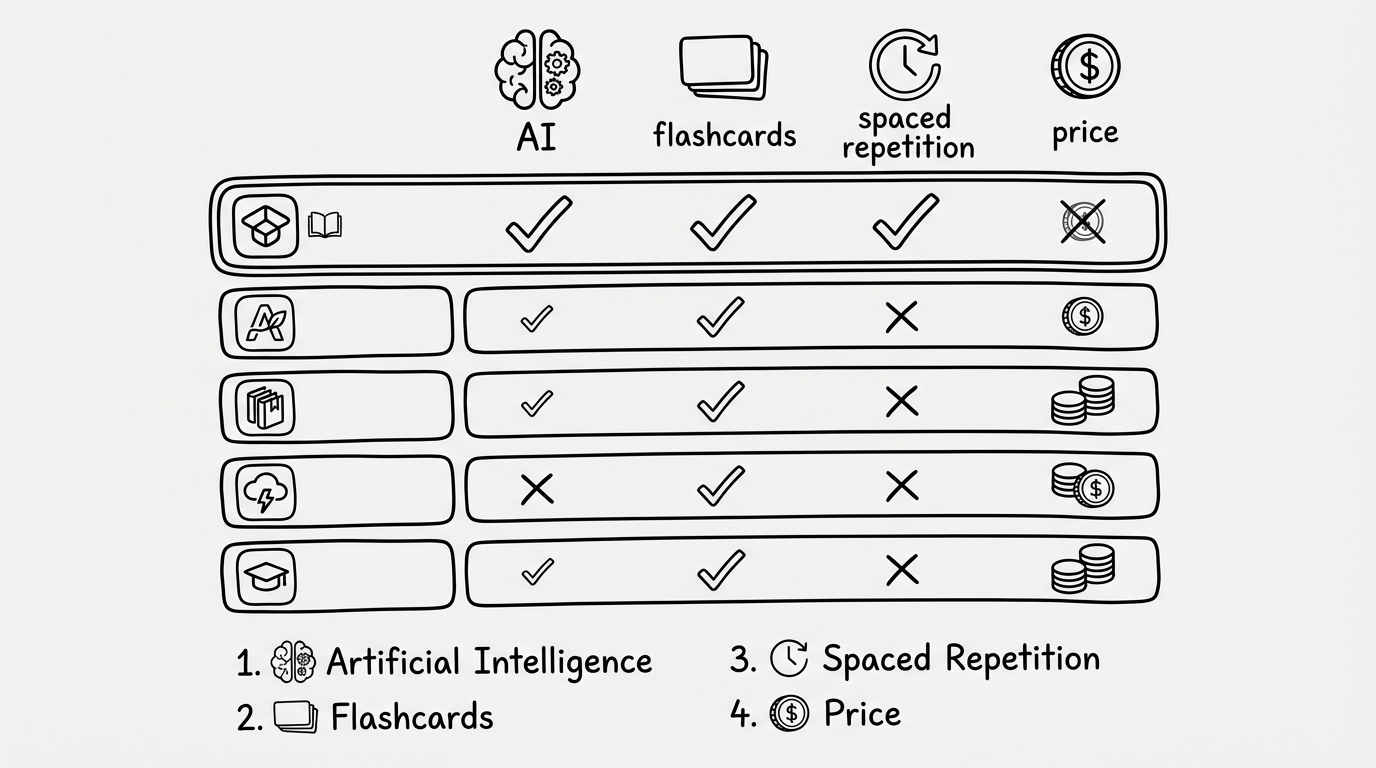
Sketch: the criteria that usually decide the winner (AI, flashcards, spaced repetition, pricing).
| Tool | AI | SRS | Offline | Typical price | |
|---|---|---|---|---|---|
| oktiEmpfohlen | ✅ | ⭐⭐⭐⭐⭐ | ✅ | ⚠️ | free / optional |
| Anki | ⚠️ | ❌ | ✅ | ✅ | free (iOS one-time) |
| Quizlet | ⚠️ | ⭐⭐⭐ | ⚠️ | ⚠️ | subscription |
| RemNote | ✅ | ⭐⭐ | ✅ | ⚠️ | subscription |
| Notion | ⚠️ | ⭐⭐ | ❌ | ⚠️ | free/paid |
| Video platforms | ❌ | ❌ | ❌ | ⚠️ | free/paid |
| Retain (similar) | ✅ | ⭐⭐⭐⭐ | ✅ | ✅ | subscription |
| GoodNotes/OneNote + SRS | ✅ | ⚠️ | ✅ (external) | ✅ | mixed |
| Minimalist SRS apps | ❌ | ❌ | ✅ | ✅ | free/low |
- AI flashcards from PDFs
- Spaced repetition built-in
- Fast, focused workflow
- Best offline SRS
- Total customization
- Requires setup time
- Huge library of sets
- Many study modes
- SRS is limited
1) okti (AI flashcards from PDFs)
okti is built for the most common real-world student workflow: you have lecture materials as PDFs, you need flashcards quickly, and you want long-term retention through spaced repetition.
Who is okti for?
- You study from lecture slides, scripts, papers.
- You want to stop copy-pasting content into flashcards.
- You want high-quality cards with minimal effort.
Typical workflow
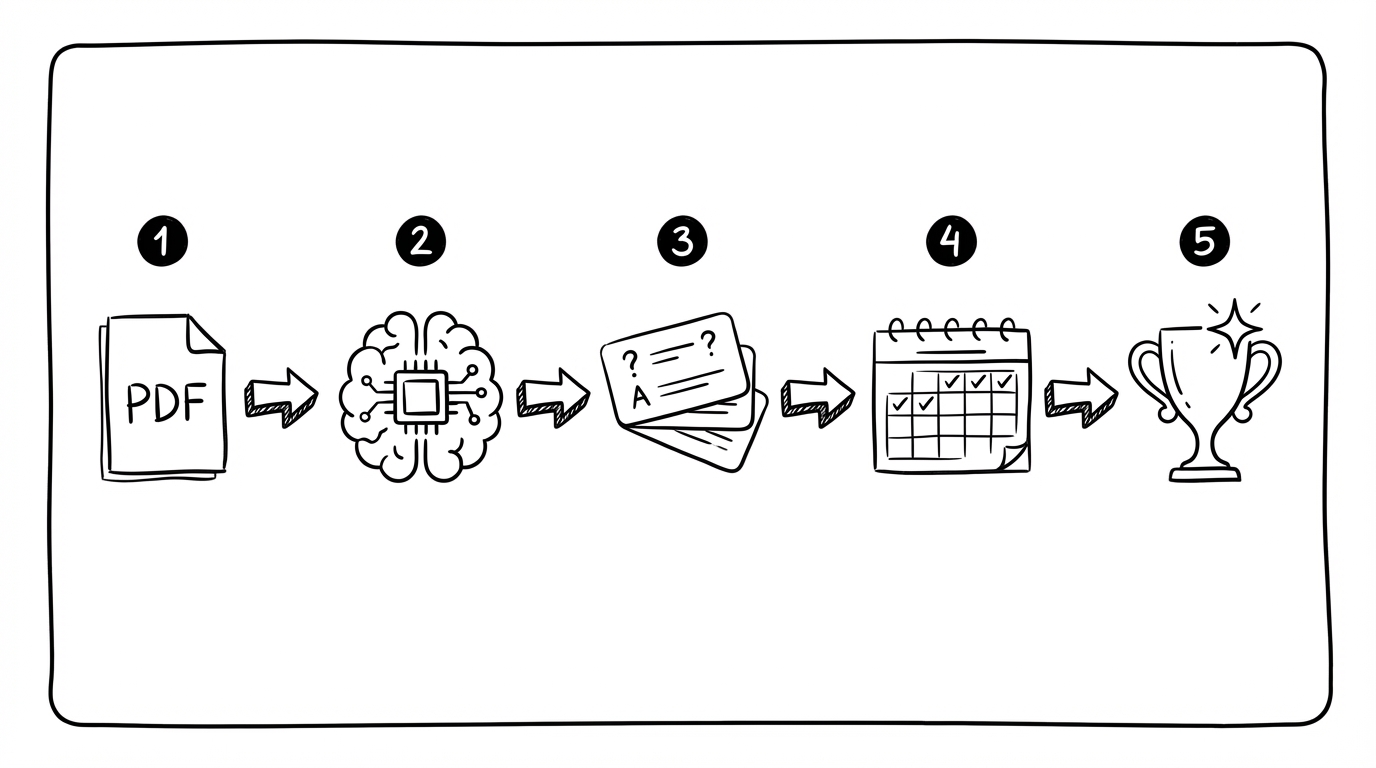
Sketch: a practical workflow from PDF → AI extraction → flashcards → spaced repetition.
- Upload a PDF
- AI extracts core concepts
- Review/edit the generated cards (fast)
- Study with spaced repetition
- Before exams, focus on weak cards
Strengths
- fast material-to-card pipeline (PDF to flashcards with AI)
- study-ready card structure (short, testable, active recall)
- built-in spaced repetition
- clean interface
- AI Chat (beta): ask questions about your own documents, notes, and decks — the chat can create flashcards, quizzes, and notes for you (changes apply only after your approval)
- Tutor mode: a personal AI tutor that asks about your goal and builds a personalized path of interactive lessons
Limitations (honest)
- community deck ecosystem is still growing
- offline/native app features depend on product roadmap (web app is usable)
Want to try the PDF workflow?
Upload your lecture slides and generate your first flashcards in minutes.
Open okti2) Anki (maximum control)
Anki is the classic spaced repetition app. It’s extremely powerful and reliable.
Why students love Anki
- excellent SRS algorithm
- works offline
- huge ecosystem of add-ons and shared decks
Why students quit Anki
- card creation is manual and time-consuming
- UI can feel outdated
- easy to spend time “tweaking” instead of studying
Commit to a simple routine: create cards right after the lecture, and do daily reviews every day (even 10 minutes). Consistency beats perfect settings.
3) Quizlet (community + modes)
Quizlet is popular because it’s easy and social. It shines for vocabulary, definitions, and quick studying.
Best for
- using pre-made sets
- short-term exam prep
- gamified study modes
Watch-outs
- spaced repetition isn’t as strong as dedicated SRS tools
- many features are paywalled
4) RemNote (notes + SRS)
RemNote combines note-taking and flashcards. You build structured notes and turn parts into cards.
Best for
- students who like outlines and linked knowledge
- people who want context inside their flashcards
Not ideal for
- “open app and start reviewing immediately” simplicity
5) GoodNotes/OneNote + SRS workflow
GoodNotes/OneNote are excellent for capturing lecture content (handwriting, diagrams). They are not spaced repetition engines.
A practical approach:
- notes in GoodNotes/OneNote
- flashcards + SRS in Anki or a dedicated AI flashcard tool
This is a great hybrid if you need handwriting + long-term retention.
6) Notion (your study OS)
Notion is an organizational powerhouse: course dashboards, reading lists, summaries, project planning.
But:
- it’s not a native SRS tool
- you’ll likely pair it with a flashcard app
7) Study video platforms (understanding first)
Video platforms are great for building understanding quickly. They don’t replace SRS.
Common combo:
- videos for comprehension
- flashcards + spaced repetition for retention
8) Retain and similar AI tools
There are AI tools that generate flashcards from text and sometimes PDFs. Some are solid.
Checklist before you commit:
- can you edit cards quickly?
- does the AI keep context from your PDF?
- is SRS built-in and usable daily?
9) Minimalist spaced-repetition apps
If you want “flashcards + SRS and nothing else”, minimalist tools can work well. But they rarely include PDF import or AI.
Feature comparison table
| Feature | StudySmarter | okti | Anki | Quizlet | RemNote |
|---|---|---|---|---|---|
| PDF → flashcards | ⚠️ | ✅ | ⚠️ | ⚠️ | ✅ |
| AI card quality | ⭐⭐⭐ | ⭐⭐⭐⭐⭐ | ❌ | ⭐⭐⭐ | ⭐⭐ |
| Spaced repetition | ✅ | ✅ | ✅ | ⚠️ | ✅ |
| Offline | ✅ | ⚠️ | ✅ | ⚠️ | ⚠️ |
| Setup effort | low | low | high | low | medium |
Pricing comparison
Prices change often. Treat this as an orientation.
| Tool | Free tier | Paid tier | Notes |
|---|---|---|---|
| okti | ✅ | optional | worth it if it saves you hours of card creation |
| Anki | ✅ | iOS one-time | great long-term value |
| Quizlet | ✅ (limited) | subscription | many features behind paywall |
| RemNote | ✅ | subscription | best if you want notes + SRS |
| StudySmarter | ✅ (limited) | subscription | strongest when you rely on community decks |
How to choose (10-minute checklist)
Instead of testing nine apps for hours, do this quick evaluation.
1) Can you convert material into testable cards fast?
Ask:
- How many clicks from “open PDF” to “I can review cards”?
- Is there bulk generation?
- Is editing frictionless?
2) Are the cards actually good?
Bad card (too big):
- “Explain everything about glycolysis.”
Better atomic cards:
- “What is the goal of glycolysis?”
- “What are the net products of glycolysis?”
- “Where does glycolysis occur in the cell?”
AI is useful when it helps you create atomic cards consistently.
3) Does the review mode fit your daily life?
SRS only works if it becomes a habit.
- can you do 10 minutes on your phone?
- can you do it offline?
- does the app keep you focused?
4) Does it help in exam mode?
You want:
- weak-card filters
- focused sessions
- export/backups
The biggest loss when switching apps is not your content — it’s your review history. Plan a 1–2 week transition instead of migrating everything at once.
A practical weekly routine (that works with any app)
Most students don’t fail because they picked the “wrong” app — they fail because the workflow is too heavy to repeat every week. Here’s a routine that stays realistic even in busy semesters.
Monday: capture + mark what matters
- save the slides/script as a PDF
- write down 3–5 “exam signals” (what the lecturer emphasized, what felt new, what you didn’t understand)
Tuesday: create flashcards (20–40 minutes)
- generate a batch of cards from the PDF or your notes
- delete duplicates
- split oversized cards into smaller atomic ones
- add 1–2 example cards for tricky concepts
Wednesday–Friday: daily reviews (10–20 minutes)
- do only what’s due
- avoid backlog at all costs (backlog is motivation-killer)
Weekend: understanding + transfer
- do 1–2 exercises (old exam questions if possible)
- turn mistakes into new cards (“mistake cards” are high-impact)
It combines active recall (flashcards) with transfer (problems), while keeping the workload small enough to maintain consistency.
Which alternative fits which student type?
You study mostly from PDFs (slides, scripts, papers)
- choose okti if you want the fastest path from PDF → study-ready cards → spaced repetition
- choose RemNote if you want deeply structured notes + cards
- choose Anki if you’re willing to build/import and customize
You want maximum control and offline reliability
- choose Anki
You rely on pre-made sets and social studying
- choose Quizlet (or keep StudySmarter) if community content is the main value for you
You need to understand topics first (then memorize)
- use video platforms for comprehension, then a spaced repetition tool for retention
Migration: switching from StudySmarter
- Export your decks (CSV if possible)
- Decide if you need your old scheduling history (usually you can’t migrate it)
- Import into your new app
- Start with one course first
FAQ
In some regions, StudySmarter has been branded as Vaia. Availability and pricing can differ by country. If you’re unhappy, evaluate alternatives based on workflow (PDFs, SRS, AI), not the brand name.
Pick a tool that combines PDF handling + high-quality AI flashcard generation + built-in spaced repetition. That’s exactly the workflow okti is designed for.
Anki wins on spaced repetition control and offline reliability. StudySmarter wins on convenience and community decks. If your bottleneck is creating cards, an AI-first tool like okti can be the best middle ground.
Yes. A common setup is: notes in GoodNotes/OneNote/Notion + flashcards with spaced repetition in okti or Anki.
For short-term cramming, community sets and easy modes can help (Quizlet/StudySmarter). For durable memory, spaced repetition tools win — but they work best when started earlier.
No. AI can speed up preparation (turning materials into flashcards), but you still need to understand core concepts. A good approach is: first build understanding (lecture, textbook, videos, exercises), then use spaced repetition to make that understanding durable.
Bottom line: Your best StudySmarter alternative depends on your workflow. If you study from PDFs and want the fastest path to high-quality flashcards with spaced repetition, okti is often the most practical choice in 2025.
Related posts
App alternatives
Anki vs Quizlet in 2026: Which Alternative Is Actually Better for Students?
App alternatives
Knowt Alternative 2026: 9 Better Options for Flashcards, AI Summaries, and Faster Studying
App alternatives
StuDocu Alternative 2026: 9 Legal & Free Ways to Get Study Notes, Summaries, and Flashcards