10 Best TurboLearn Alternatives in 2026: A Comprehensive Guide
Looking for TurboLearn alternatives? Compare the top 10 AI-powered study tools for students in 2026, including okti, Notion AI, StudyFetch, Gizmo and more. Find the right study app with our feature comparison and sourced pricing guide.
10 Best TurboLearn Alternatives in 2026: A Comprehensive Guide
With more than 10 million learners according to its own website, TurboLearn (now rebranded as Turbo AI) has established itself as a very popular AI-powered learning tool. Whether due to pricing concerns, feature limitations, or simply looking for different functionality – many students are seeking alternatives. That’s why we’ve tested and compiled the 10 best TurboLearn alternatives in this comprehensive guide.
What is TurboLearn (Turbo AI)?
Turbo AI, formerly TurboLearn AI, is an AI-powered note-taking and study platform that transforms various content types into comprehensive study materials. According to its website (October 2026), key features include:
- AI-powered note generation from lectures, PDFs, YouTube videos, and your own notes
- Content transformation into flashcards, quizzes, activities, and podcasts
- AI notetaker that records and transcribes live lectures
- Docs editor and collaboration: a Google Docs-style editor with shared, live-editable docs
- Premade study guides, including a library of AP study guides
- Cross-device synchronization across web and mobile apps
Pricing: Turbo AI offers a free tier and a paid upgrade for unlimited features. It does not list prices on its website, so check the current price in the app before you subscribe.
Why Look for Alternatives?
Many students seek alternatives to TurboLearn because the platform has some limitations:
- Missing Spaced Repetition - No scientifically-backed repetition method for long-term learning
- Unreliable AI Generation - The AI often creates odd or inaccurate content
- Limited Features - Many important learning features are missing or only superficially implemented
- Restricted Free Version Access - Many features locked behind a paywall
- Compatibility issues with certain workflows and study systems
- Missing integrations or customization options
Top 10 TurboLearn Alternatives
1. okti - Best Overall Alternative
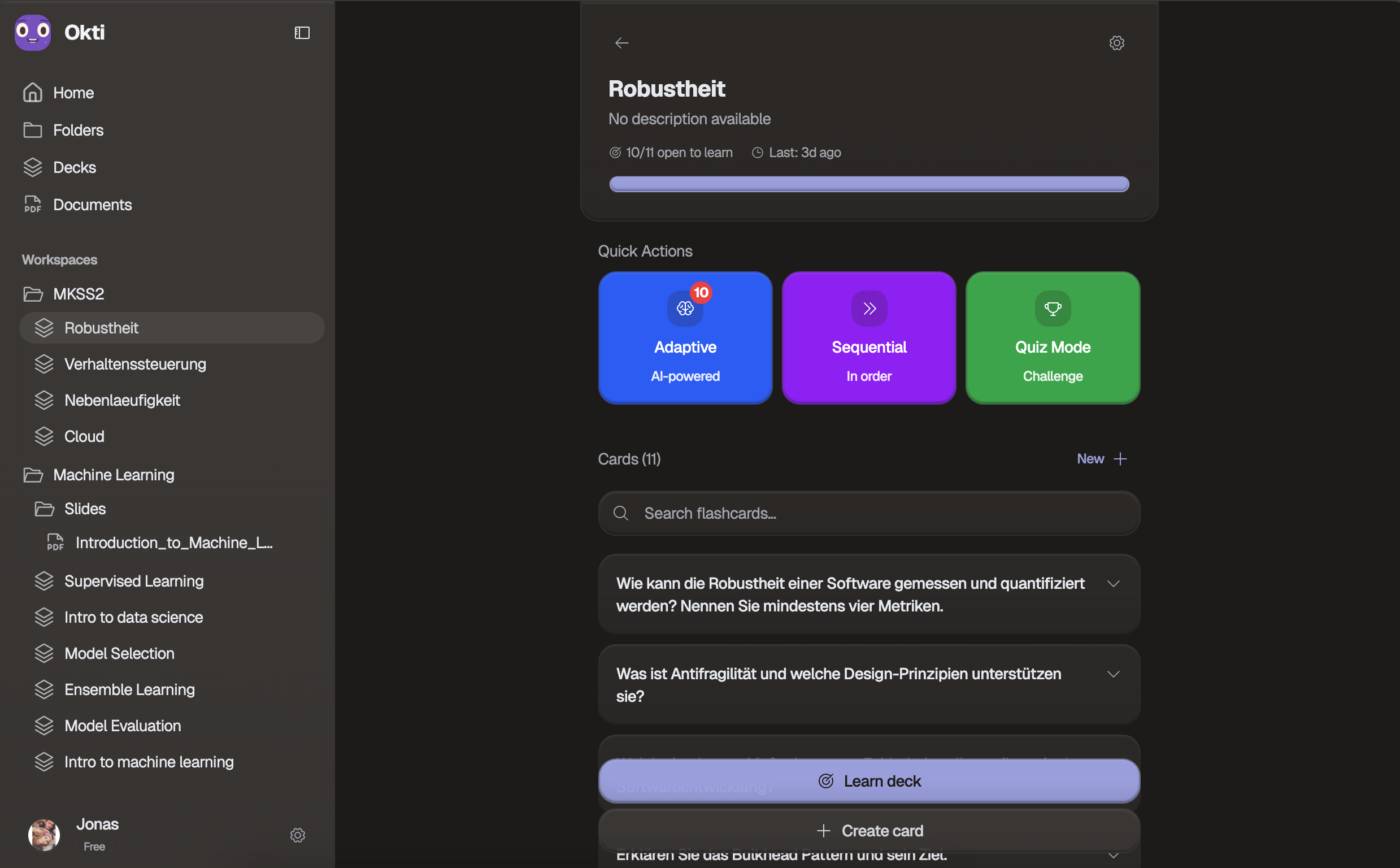 okti’s clean homepage showcasing AI-powered study features
- ✅ Flashcards & spaced repetition
- ✅ Cross-device sync
- ✅ AI voice & text feedback
- ✅ Smart flashcard generation
- - Pro: all AI features without the monthly free limits (fair use)
Best for: Students who prefer flashcard-based learning with AI assistance
Get instant, personalized feedback when answering flashcards out loud or in writing
Upload PDFs, PowerPoint, Word or Excel files, scans and photos of handwritten notes, add a YouTube link, or paste text to create flashcards automatically. Create flashcards directly from the PDF view
Create notes manually or have them generated directly from PDFs – perfect for structured summaries of your study materials
Chat with your own documents, notes, and flashcard decks – the chat can create flashcards, quizzes, and notes for you (changes apply only after your approval)
A personal AI tutor that asks about your learning goal and builds a personalized path of interactive lessons
Turn documents and notes into audio lessons discussed by AI hosts – raise your hand to interrupt and ask questions by voice
True/false, MCQs, and open-ended questions for engaging study sessions
Add personal notes, mnemonics, or additional context to any flashcard
Science-backed algorithm that optimally schedules reviews
Real-time analysis to identify knowledge gaps and adjust your study plan
Perfect synchronization across phone, tablet, and laptop
Use the app without AI features when you prefer traditional flashcard studying
okti takes a different approach than most alternatives by focusing primarily on flashcard-based active learning. It combines traditional active recall and spaced repetition methods with modern AI features:
- Flashcards: Automated creation from PDFs, slides, documents, photos and YouTube videos (also directly from the PDF view) and AI voice & text feedback during learning
- Notes: Standalone note creation – manually or generated directly from PDFs
- AI Chat (beta) & Tutor mode: Chat with your own documents and decks (the chat can create study material for you, with your approval), or let the personal AI tutor build a lesson path toward your goal
-
Flashcard-first approach: Unlike most alternatives that focus on note-taking, okti centers around flashcard creation and spaced repetition for active learning
-
Affordable pricing: You can start on the free plan and upgrade to Pro when you need unlimited AI features. See current pricing.
-
Voice feedback option: Includes an AI voice feedback feature that lets you practice answering questions verbally, which may appeal to auditory learners
-
Free tier available: The free version includes core flashcard features with limited AI capabilities, allowing you to test the platform before upgrading
-
AI-powered content generation:
- Flashcards: Automatic creation from study materials or directly from the PDF view
- Notes: Standalone note creation, generated directly from PDFs or created manually
You prefer flashcard-based studying with AI-powered content generation, want an affordable AI study tool, or are interested in practicing answers verbally with AI feedback. Note that okti focuses on flashcards and notes rather than lecture recording: it does not record live lectures or turn audio files into notes. You can import a recorded lecture from YouTube, and you can speak your flashcard answers and your questions in the AI chat. If you specifically need live lecture recording, consider Turbo AI, StudyFetch, Coconote, or Mindgrasp.
2. Notion AI
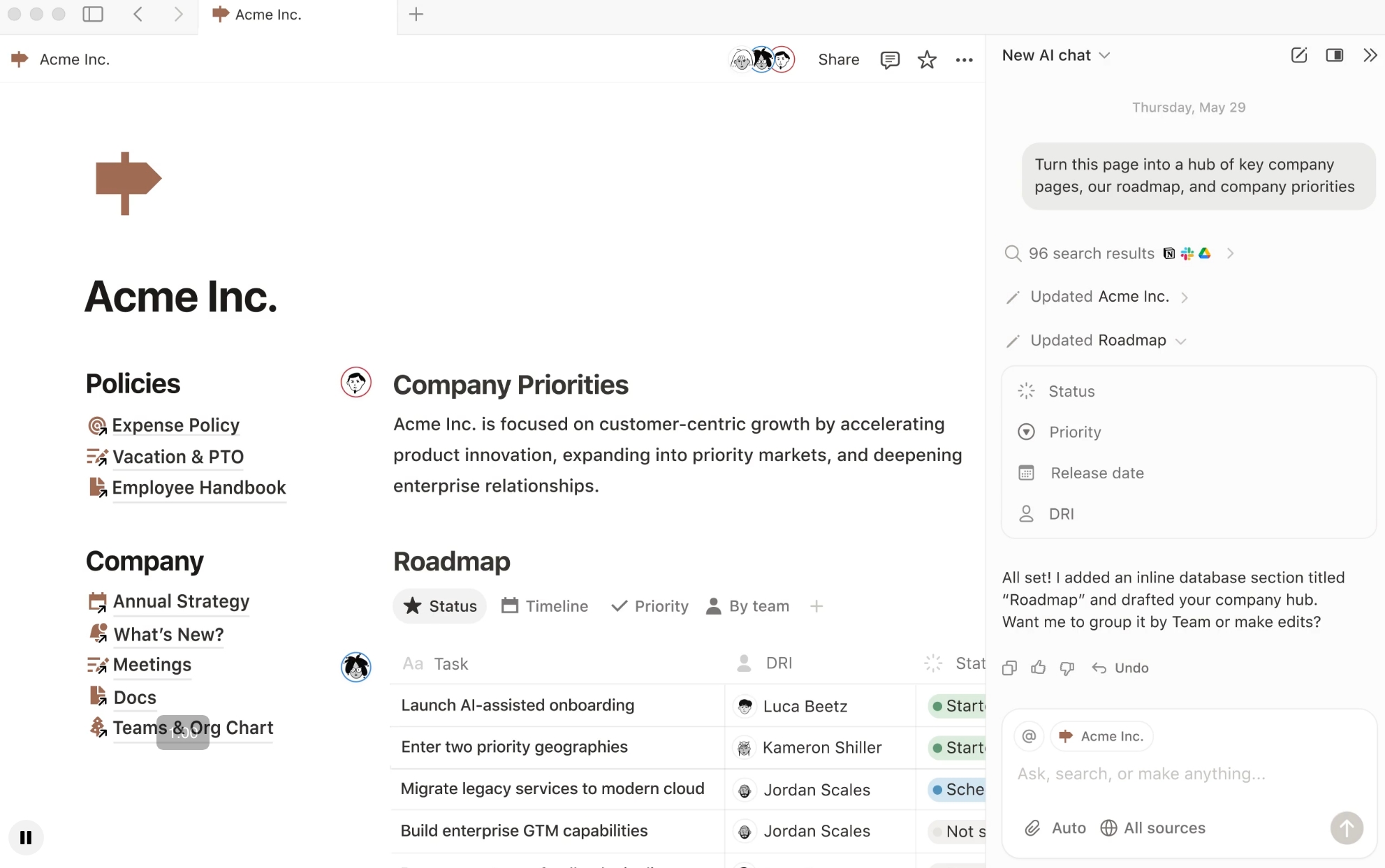 Notion’s AI-powered workspace with comprehensive productivity tools
Pricing: Free plan available. Plus costs $12 per member per month, or $10 per month billed yearly. Free and Plus only include a limited Notion AI trial; the full AI features (Notion Agent, AI Meeting Notes) come with Business at $24 per member per month, or $20 billed yearly (per Notion’s pricing page, Oct 2026)
Best for: Students who need comprehensive productivity tools beyond studying
Key Features:
- AI-powered note generation
- Custom templates for students
- Google Calendar integration
- Task tracking and reminders
- Database capabilities for organizing study materials
Why choose Notion AI? Offers a comprehensive, all-in-one solution that combines notes, tasks, and calendar into one powerful workspace.
3. StudyFetch

Pricing: Free plan with limited chats, uploads and study sets. Paid plans are listed at $7.99/month (Base) and $11.99/month (Premium, which includes the live lecture assistant) per Tool Directory, re-checked Aug 2026. StudyFetch does not list prices on its own website.
Best for: Students wanting similar features to TurboLearn without the cost
Key Features:
- AI flashcards and quizzes
- Note-taking and lecture capture
- PowerPoint transformation
- AI tutor (Sparky) and study plans
- AP exam resources
Why choose StudyFetch? Directly comparable to TurboLearn’s core features with a free plan and competitive pricing. For a closer look, see our StudyFetch alternative comparison.
Some users find the interface cluttered with too many features competing for attention, which can make navigation less intuitive compared to more streamlined alternatives like okti.
4. Coconote

Pricing: Free to get started. Unlimited use requires a paid plan; Coconote does not list the price on its website and third-party listings disagree, so check the current price in the app.
Best for: Students wanting viral, trending AI note-taking
Key Features:
- Instant lecture to organized notes transformation
- Automatic quiz and flashcard generation
- Podcast creation from notes
- Upload PDFs, documents, videos and links
- Strong App Store ratings
Why choose Coconote? Excellent user experience with comprehensive study material generation from recorded lectures.
5. ChatGPT

Pricing: Free plan available, Go at $8/month, Plus at $20/month (US prices per Suprmind, verified Sep 2026 against OpenAI’s pricing pages)
Best for: Students needing personalized help and writing support
Key Features:
- Natural conversation interface
- Instant summaries and explanations
- Multilingual support
- Functions as tutor, editor, and content generator
- Custom GPTs for specific subjects
Why choose ChatGPT? Focuses on conversational assistance and personalized learning rather than automated note-taking. We also have a full guide on how to use ChatGPT for studying.
6. Mindgrasp
Pricing: Free trial, then paid plans from $9.99 to $14.99 per month (Basic, Scholar, Premium) per Toolradar, verified Oct 2026. Mindgrasp does not list prices on its homepage.
Best for: Students needing extensive language support and multiple content formats
Key Features:
- 20+ language support
- Lecture recording and transcription
- AI-generated videos and audio recaps
- Automatic study aid creation
- Video analysis capabilities
Why choose Mindgrasp? Broad AI study platform with extensive features including video analysis and multi-language support. Considering it? Also check our Mindgrasp alternatives comparison.
7. Quizlet
 Quizlet’s popular flashcard platform with millions of study sets
Pricing: Free plan available, Plus at $7.99/month or $35.99/year per Mindomax, read from Quizlet’s upgrade page in Sep 2026
Best for: Students who want access to millions of pre-made flashcards and collaborative study tools
Key Features:
- 500+ million pre-made flashcard sets
- Multiple study modes (learn, test, match, flashcards)
- Spaced repetition system
- Collaborative study sets
- Diagram and image-based learning
- AI study tools such as Magic Notes (the Q-Chat tutor was discontinued in June 2025)
Why choose Quizlet? One of the most popular flashcard platforms with a massive library of community-created content and proven study modes. If Quizlet’s paywalls bother you, see our free Quizlet alternatives for 2026.
8. Gizmo
Pricing: Free plan with a daily number of lives (wrong answers cost a life). The paid Gizmo Unlimited plan is billed weekly or yearly according to third-party reviews; Gizmo does not list prices on its website, so check the current price in the app.
Best for: Students who want quick AI quizzes with game mechanics
Key Features:
- AI quizzes and flashcards
- Import from PDFs, PowerPoint slides, YouTube videos, notes, and Quizlet sets
- Mobile apps
Why choose Gizmo? Fast “generate cards, review daily” workflow with a playful, game-like feel. If the lives on the free plan get in your way, see our Gizmo alternative comparison.
9. MyStudyLife
Pricing: Free (MyStudyLife describes itself as a free student planner on its website, Oct 2026)
Best for: Students focusing on study planning and time management
Key Features:
- Class and exam schedule tracking
- AI-powered reminders and deadlines
- Cloud sync across devices
- Task prioritization with AI
- Scout, an AI study partner that plans your week and revision
Why choose MyStudyLife? Complements other note-taking tools by focusing specifically on organization and time management.
10. Gemini Notebook (formerly NotebookLM)
Pricing: Free with a Google account. Higher limits come with Google AI Plus, Pro and Ultra; Google lists those prices on its AI plans page.
Best for: Students who want to research and ask questions across their own sources
Key Features:
- Chat with answers grounded in your uploaded sources
- Audio Overviews and Video Overviews of your material
- Flashcards and quizzes
- Up to 100 notebooks with 50 sources each on the free plan
- Renamed from NotebookLM to Gemini Notebook in July 2026
Why choose Gemini Notebook? Strong for understanding and summarizing sources, with less focus on long-term review. Compare it with other options in our NotebookLM alternatives guide.
Earlier versions of this list included Upword and StudyBlaze. Both websites no longer work (upword.ai shows a parked domain, the StudyBlaze domain has expired), so we replaced them with Gizmo and Gemini Notebook.
Feature Comparison Table
| Tool | Free Plan | AI Notes | Flashcards | Quizzes | Lecture Recording | Special Features |
|---|---|---|---|---|---|---|
| oktiEmpfohlen | Yes | Yes | Yes | Yes | No | Voice feedback, spaced repetition, YouTube import, AI chat & tutor mode |
| Notion AI | Yes | Yes | No | No | No | All-in-one workspace |
| StudyFetch | Yes | Yes | Yes | Yes | Yes | AP exam resources |
| Coconote | Yes | Yes | Yes | Yes | Yes | Podcast generation |
| ChatGPT | Yes | Yes | No | No | No | Conversational AI |
| Mindgrasp | No | Yes | Yes | Yes | Yes | 20+ languages, video analysis |
| Quizlet | Yes | No | Yes | Yes | No | 500M+ study sets, multiple study modes |
| Gizmo | Yes | No | Yes | Yes | No | Game mechanics, Quizlet import |
| MyStudyLife | Yes | No | No | No | No | Study planning focus |
| Gemini Notebook | Yes | Yes | Yes | Yes | No | Source-grounded chat, Audio Overviews |
Choosing the Right Alternative
- Completely Free: MyStudyLife (planning and organization)
- Free with Premium Options: ChatGPT, Quizlet, StudyFetch, Gemini Notebook, okti
- Affordable Premium: Quizlet ($7.99/month), StudyFetch Base ($7.99/month), see the sourced prices above
- Consider Your Needs: Lower price doesn’t always mean better value — choose based on which features you’ll actually use
- Most Similar Features: StudyFetch, Coconote, Mindgrasp (all include lecture recording and automatic note generation)
- Flashcard-Focused Alternative: okti (note and flashcard generation from documents, slides, photos and YouTube, with a focus on active learning instead of lecture recording)
- Enhanced Productivity: Notion AI (adds comprehensive workspace tools)
- Writing & Research: ChatGPT
- Organization: Notion AI
- Planning: MyStudyLife
- Research & Summaries: Gemini Notebook
- Flashcard Practice: okti
- Quick Game-Like Quizzes: Gizmo
- Auditory Learners: okti (voice feedback option), Coconote (podcast generation), Gemini Notebook (Audio Overviews), ChatGPT (conversational learning)
- Visual Learners: Gizmo (gamified quizzes), Mindgrasp (video analysis), Quizlet (diagram learning)
- Reading/Writing Learners: Notion AI (comprehensive note-taking), Quizlet (text-based flashcards)
- Kinesthetic/Active Learners: okti (active recall with flashcards), Quizlet (interactive study modes), Gizmo (interactive quizzes)
Quick Pricing Overview
Compare the most popular options at a glance. Third-party prices are in US dollars, come from the sources linked above (as of Aug to Oct 2026) and can differ by country:
| Tool | Free Tier | Pro Pricing | Free Features | Pro Features | Best For |
|---|---|---|---|---|---|
| oktiEmpfohlen | Free | See pricing | Flashcards, Spaced repetition, Limited AI feedback & generation | AI voice & text feedback and smart generation without monthly free limits (fair use) | Active learning & retention |
| MyStudyLife | Free | — | Schedule tracking, Reminders, Cloud sync | No paid plan listed on its website | Planning & organization |
| ChatGPT | Free | Go $8/mo, Plus $20/mo | Basic AI chat, Text generation | Higher limits, Newer models, Custom GPTs | Writing & research |
| StudyFetch | Free | $7.99-$11.99/mo | Limited chats, uploads & study sets | More AI usage, Live lecture assistant (Premium) | TurboLearn alternative |
| Notion AI | Free | Plus $12/mo, Business $24/mo | Note-taking, Basic databases, AI trial | Full Notion AI with Business | All-in-one workspace |
| Coconote | Free to start | See in app | Basic notes, Limited generation | All AI features without monthly free limits (fair use) | Comprehensive notes |
| Mindgrasp | Free trial | $9.99-$14.99/mo | Trial access to all features | Video analysis, Multi-language, Audio recaps | Multi-format content |
| Quizlet | Free | $7.99/mo | Flashcards, Study modes, Community sets | AI study tools, Ad-free, Advanced study modes | Flashcard learning |
Pros and Cons Summary
- Often more affordable pricing
- Specialized features for specific needs
- Different user interface and workflow options
- Some offer completely free plans
- Better integration with existing tools
- May lack some advanced features of TurboLearn
- Learning curve for new platforms
- Data migration challenges
- Inconsistent feature sets across alternatives
Conclusion
The search for TurboLearn alternatives in 2026 offers students numerous options, each with unique strengths for different needs:
- For lecture recording and auto-note generation: StudyFetch, Coconote, or Mindgrasp most directly replace Turbo AI’s core functionality
- For flashcard-based active learning: okti offers an affordable option with AI assistance
- For all-in-one productivity: Notion AI combines notes, tasks, and databases
- For conversational learning: ChatGPT provides versatile AI tutoring
- For planning and organization: MyStudyLife is completely free
The right choice depends on your specific study habits, budget, and feature requirements. Consider what you actually need:
- Do you primarily need lecture recording and transcription? → StudyFetch, Coconote, Mindgrasp
- Do you prefer flashcard-based active learning with AI? → okti, Gizmo
- Do you want an all-in-one workspace? → Notion AI
- Are you on a tight budget? → MyStudyLife (free), or free tiers of other apps
Many students find success using multiple tools together — for example, Notion AI for organizing notes, ChatGPT for quick explanations, and a specialized flashcard app for memorization. Experiment with free tiers to find what works best for your learning style.
Frequently asked questions (FAQ)
Is there a free TurboLearn alternative?
Yes. MyStudyLife is free for study planning, and okti, Quizlet, StudyFetch, Gemini Notebook and ChatGPT all have free plans with limits. okti Free lets you create flashcards and notes from your documents with monthly limits on AI generations; okti Pro removes them. See okti pricing.
Can okti record lectures like Turbo AI?
No. okti does not record live lectures or turn audio files into notes. You can import a lecture from YouTube, upload your slides, PDFs or photos of your notes, and answer flashcards or ask the AI chat questions by voice.
Find your ideal study tool
Try the free tiers of different alternatives to see which one fits your learning style and needs best. Most offer no-commitment free plans to test their features.
Explore Study Tools